Wave Platform — User Reference Guide
Reading order. Start at the top, skim through Part 1 to get the mental model, then jump to the area you care about. Each area has a screenshot, a "what you'll do here" paragraph, a data-points reference, and a "hidden context" section for the behaviors that aren't obvious from the screen alone. Part 3 is the implementation guide for new tenants. Part 4 onward is reference material.
Document snapshot date: 2026-06-11. Audience: CEO + operators at a customer organization, plus internal Tidal Wave staff onboarding a new tenant. Companion docs:
- Daily release log — chronological record of what shipped each day
- Operator console inventory — engineering-level per-route catalog
- Tenant setup catalog — the per-flag, per-connector, per-cron technical catalog
- Tenant onboarding runbook — the canonical dependency-ordered setup path (supersedes Part 3 below), with its gap register
Snapshot caveat. This guide was authored against the operator console as of 2026-06-11. Between then and the most recent ship date, 153 PRs landed — including the new Play Engine product (Phase 1–5 shipped dark on 2026-06-22), Marketo writeback implementation (#596 / #600), Channel Taxonomy v3 dark cut-over (#560 / #561 / #563 / #564, mig 0072), a mobile-responsive overhaul of every operator-console screen (#603–#617, on main, not yet on prod), a TMC cross-tenant audit-log reader UI (#602), Experiments v1.1 confidence-interval / significance badges (#601), Content Intelligence Phase 3 auto-regeneration wiring (#598), SOC2 Phase 0 SecretsProvider Protocol (#599), the tenant-website ingest archetype (#534 / #536 / #538 / #539 / #549), and bug-sweep Waves A-D (91 bugs fixed: #611 / #614 / #619 / #620). Where those changes alter claims in this guide, the daily release log is the source of truth — see Part 7 (Recent additions) below for the major callouts. The next refresh of this guide should sweep in those changes; for now, treat the surface-by-surface tour as a 2026-06-11 snapshot.
Table of contents
- Part 1 — The big picture — what the platform does, the mental model, the four core products
- Part 2 — A tour of the operator console — screen by screen
- Part 3 — Implementation guide — the recommended setup sequence for a new tenant
- Part 4 — Data point reference — every metric / badge / status defined in one place
- Part 5 — Hidden context — the non-obvious behaviors operators trip on
- Part 6 — Glossary
- Part 7 — Recent additions (since 2026-06-11) — what landed between the snapshot date and now
Part 1 — The big picture
What the Wave Platform does, in one sentence
The Wave Platform sits alongside your existing marketing stack (HubSpot, Snowflake, your CRM, your MAP), reads every signal you already collect — content engagement, channel arrivals, outbound sends, account activity — and turns it into per-person predictions and per-account "where is this motion heading" trends, which it then writes back to your CRM as custom properties your existing playbooks can act on. It does not send a single piece of outreach itself. Your marketing team keeps owning the send; the platform just gets a lot smarter about who, what, and when.
The mental model in four pictures
Picture 1 — We don't replace your stack, we sit beside it
   YOUR STACK                          WAVE PLATFORM
   ─────────────                       ─────────────────
   HubSpot / Marketo  ──── read ───►   Engagement events
   Snowflake          ──── read ───►   Content + channels
   File uploads       ──── read ───►   Outbound promotions
                                            │
                                            ▼
                                       Score + classify
                                            │
   HubSpot custom      ◄─── write ──────────┘
   properties
   (`tw_predicted_promo_channel`,
    `tw_next_theme`, …)
You stay in HubSpot. Your reports stay in HubSpot. Your workflows stay in HubSpot. Wave just makes the data sharper by writing back enriched fields onto the contacts your team is already working.
Picture 2 — Predict-side and writeback-side are two separate switches
This is the most important thing for an operator to understand. For every learned-prediction product, there are two flags:
- The predict-side flag — "should we score these people?" Default: OFF.
- The writeback-side flag — "should we push the score to your CRM?" Default: OFF.
You opt in twice. You can score for a week, look at the results, and only then start pushing to HubSpot. We call this the CA-R1 carve-out — three product families ride it: Channel Affinity, Engagement Channel, Cadence Affinity.
Picture 3 — Three predictions about every person, plus a fourth about timing
Every person in your platform gets three categorical predictions (one of N choices) and one timing prediction:
| Axis | What it predicts | HubSpot property |
|---|---|---|
| Inbound Channel | How they arrived (organic search, paid social, referral, ChatGPT, etc.) | tw_predicted_inbound_channel |
| Promotional Channel | The outbound vehicle they're most likely to respond to | tw_predicted_promo_channel |
| Engagement Channel | The content format they consume (webinar, video, whitepaper, blog post, …) | tw_predicted_engagement_channel |
| Communication Cadence | Preferred time-of-day window + target days-between-touches | tw_predicted_send_window + tw_predicted_cadence_days |
You'll see all four laid out side-by-side on every person's page (the AffinityPanel).
Picture 4 — Accounts as a stack of motions
A company in your ABM program is an account. Each account has multiple motions running on it — different teams running different campaigns at different times. We surface motions at two grains:
- Marketing motions — the cross-deal playbook a marketer runs (e.g. "Enterprise Demand Gen"). One per account at any time.
- Sales motions — anchored to an opportunity (a deal in HubSpot). Multiple per account; one per opportunity.
Each motion carries a buying group (the people involved: champion, end-user, finance, etc.), a curriculum (the topics × stages those roles need to be educated on), and a traction verdict (trending up, down, or flat against the rest of your accounts).
The four core products
Content Intelligence (Product A)
Crawls every URL we see in your stack, runs the content through Anthropic to extract structured tags (themes, persona, funnel stage, industry, format), and joins that taxonomy to per-person engagement so you can answer "what has this person actually read?" and "what should we serve them next?" Tag taxonomy is per-tenant editable at /settings/taxonomy.
Channel Affinity (Product B)
Per-touch classifier turns every UTM + referrer into a canonical channel (Default-18 vocabulary). Per-person batch scorer then rolls those touches up into two predictions per person: how they arrived (Inbound Channel) and how they respond (Promotional Channel). Daily at 03:30 UTC.
Engagement Channel (Product E)
A format prediction — webinar vs blog post vs whitepaper vs video, drawn from a per-tenant content-format taxonomy you control at /settings/content-formats. Daily at 03:45 UTC. Requires Content Intelligence to have populated content_assets.format first — without format-tagged engagement events the cold-start gate refuses to score.
Cadence Affinity (Product D)
The timing dimension — preferred time-of-day window, day-of-week, and target inter-touch interval per person. Daily at 02:15 UTC, weekly retrain Mondays at 04:30 UTC. Writes back tw_predicted_send_window (morning/midday/evening/unspecified) + tw_predicted_cadence_days (number).
The structural products
Buying Groups (Product C)
Models the static shape of a buying motion: groups, roles (Champion / End User / Economic Buyer / Technical Evaluator / etc.), and a role-curriculum (per-role per-stage required themes). Then assigns real people from your CRM to those roles, builds a per-person theme queue ("what topic should this person see next?"), and writes the next-theme back to HubSpot as tw_next_theme and the role assignment as tw_buying_group_role. Hourly score, runs at **:05.
Per-Opportunity Buying Groups
The extension that lets the same person sit on multiple buying groups for different deals — the CFO who's the Economic Buyer on every opportunity at your top three accounts. Anchors a buying group to a specific HubSpot deal via buying_groups.opportunity_id. Off by default; flip buying_groups_per_opportunity_enabled to enable.
Motion Traction
Per-(account, motion) trend scoring. Five signals (seated-person engagement, seat-fill activity, multithreading depth, inbound channel touches, theme-queue progression) average into a composite that yields Trending up / Trending down / Flat plus a within-tenant percentile rank. Daily at 05:45 UTC. Below 8 accounts the cohort floor refuses to compute a percentile — verdict still renders but percentile is hidden.
The deeper layer
Next Up Content
Per-person top-3 ranked content recommendations on the person-detail page. Hybrid — for people seated in a buying group with a live top-of-queue theme, the recommendations are deterministic (driven by buying-group curriculum); for everyone else, they're learned (from a 50-asset candidate pool nearest the person's interest centroid in pgvector space). Daily at 05:00 UTC; weekly Monday retrain at 05:15 UTC with operator thumbs feedback (bounded ±0.15 nudge).
Tag-Ranking v1a
The asset ranker inside the theme queue — given a curriculum slot's theme, picks the top-ranked content asset by counting matched signals (persona, funnel-stage, industry). Shadow-runs a random-pick arm alongside so the engagement-lift gate at /admin/tag-ranking-lift can prove the ranker is actually lifting engagement.
AI Layer (5 features)
A set of optional AI-first features layered on top of the predictions:
- AI Explainability — per-prediction sentence ("She was scored Promotional: LinkedIn because…")
- NL Query — free-text operator questions ("show me people in IT at Enterprise accounts who haven't engaged in 30 days")
- AI Observations — nightly anomaly alerts on the splash page
- Content Gap Q&A — "what topics am I missing for the End User role?"
- Theme-queue reasoning — one-sentence "why this is next" for every top-of-queue item
Each is independently flag-gated and OFF by default.
Demo Experience
Local-only scenario engine for live data spikes during prospect demos. Six pre-built scenarios that mid-demo inject signal, re-run the scorer, and flip a person's Affinity card from "predicted Email" to "predicted LinkedIn" in real time. Never reachable in prod — multi-layer fences (env var + tenant flag + admin gate + frontend env check) keep it laptop-only.
Part 2 — A tour of the operator console
The shell — what you see on every page
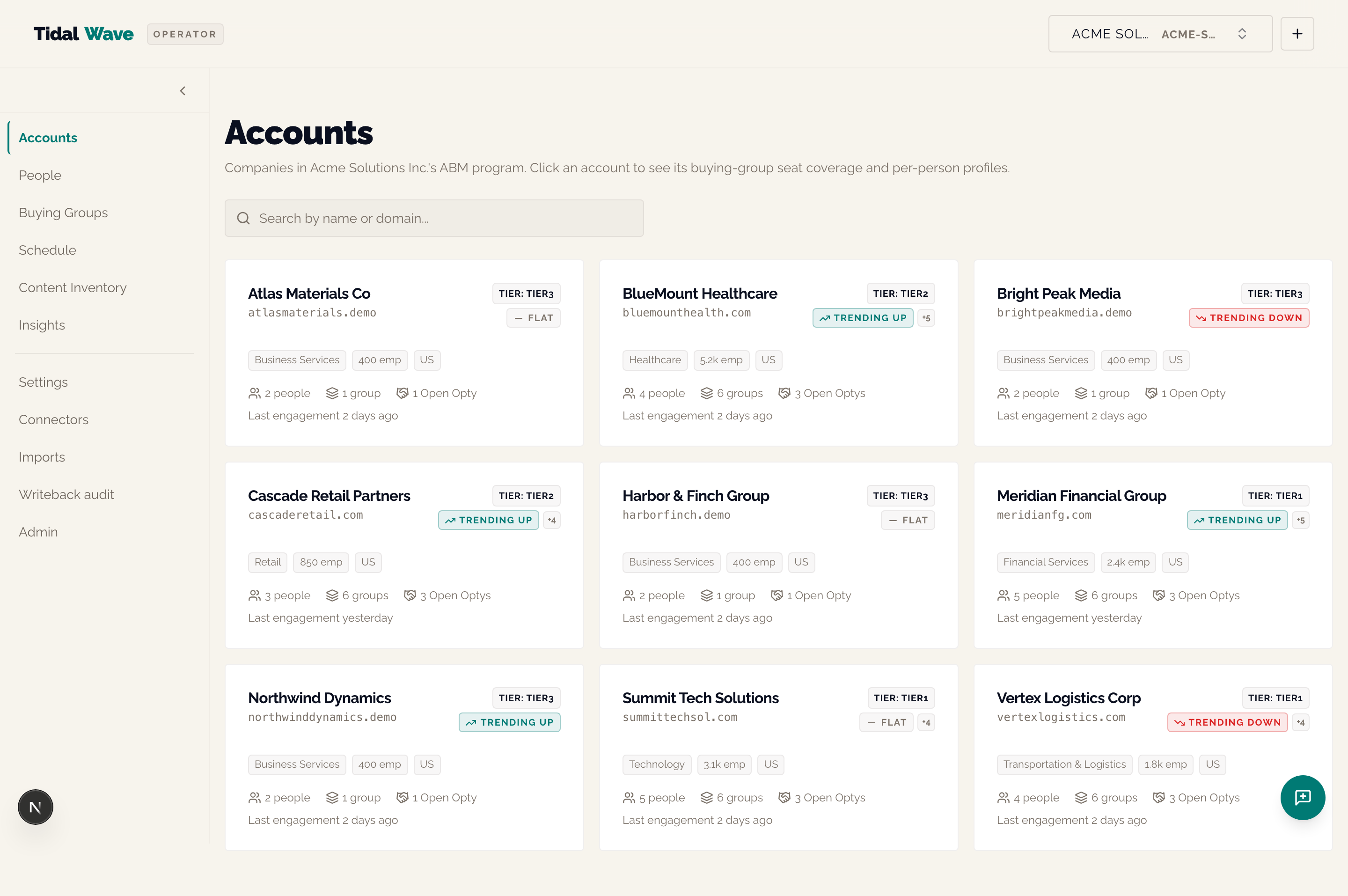
Every authenticated screen wraps three persistent elements around the main content:
- TopBar (across the top): brand mark on the left; on the right an optional
Evallink, theAdminlink (TW staff only), an "Ask Wave a question" button when NL Query is enabled, the TenantSwitcher, and (in prod) a Logout button. - SideNav (down the left): six primary destinations in locked order — Accounts · People · Buying Groups · Schedule · Content Inventory · Insights — followed by secondary items below a divider — Settings · Connectors · Imports · Writeback audit · Admin (when you're TW staff). Click the chevron at the top to collapse to icons-only; the collapse state is per-browser-session.
- FeedbackFab (bottom-right round button): opens a slide-in form for logging issues or feature requests. It auto-attaches the current page path and (when on a person/account/buying-group detail page) the record you're looking at.
When a Tidal Wave admin is impersonating one of your seats, a red sticky banner appears above the top bar naming the user being impersonated, with an "End session" button. If you don't see it, no one is impersonating you.
The splash page — /
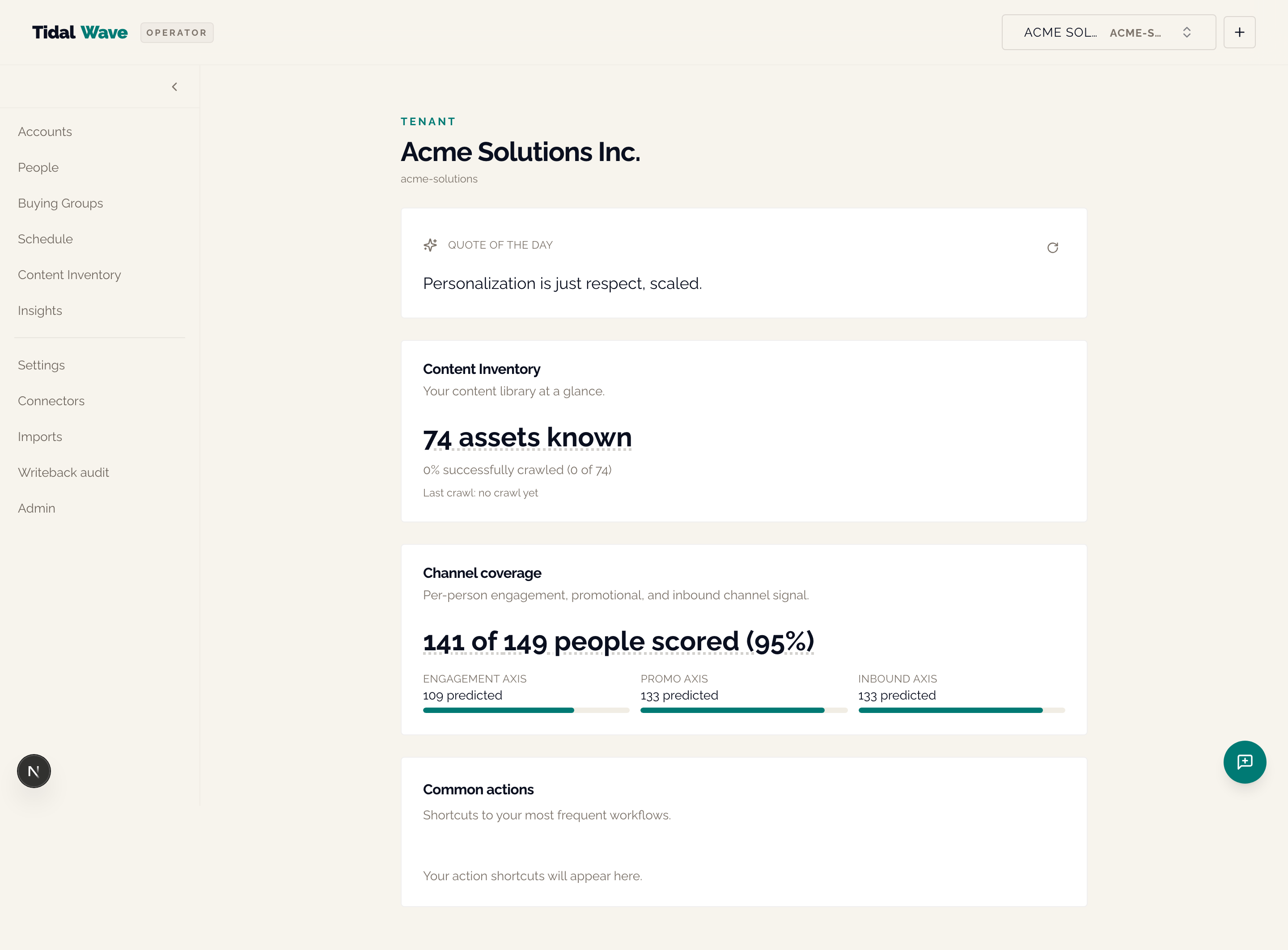
Tenant home. Three sections, top to bottom:
- Quote of the day — rotating daily by UTC date from a curated pool of marketing quotes. There's a refresh button if you want to step through the pool yourself (session-only, no persistence).
- Content Inventory card — three numbers: total assets known, % successfully crawled, last crawl timestamp.
- Channel coverage card —
X of Y people scored (Z%)headline plus three sub-bars (Engagement / Promo / Inbound axes). Cold-start state: a heat-gauge image with the copy "Warming up, check back when data has circulated."
If AI Observations is enabled, an extra AI Insight card appears below — the previous night's anomaly detections (unseated-but-engaged contacts, writeback coverage drops).
What you'll do here
Glance at the splash to see whether the platform is "warm" for this tenant. If the coverage gauge is cold, that's the signal that scoring hasn't completed yet (either it's the first day, or the connector hasn't synced, or the predict-side flag isn't on).
Hidden context
- The card order is locked — Content Inventory first, Channel coverage second — and won't change tenant-by-tenant.
- The cold-start image is
/heat-gauge-cold.png— if you see it, the platform has no predictions yet for this tenant. - There's no click instrumentation on the splash in v1; we're not tracking which card you tap.
Accounts — /accounts
The ABM hub. Every company that has at least one person synced from your CRM lands here as a card. Search by company name or domain in the search bar at the top.
Data points per card
| Element | What it means |
|---|---|
| Account name | Display name from your CRM (HubSpot Company name) |
| Domain | acme.com — clickable; opens the company website |
Tier badge (TIER: TIER1) | Operator-set account tier; persisted on the account row |
Traction chip (↗ TRENDING UP / — FLAT / ↘ TRENDING DOWN) | The most-positive motion's traction verdict. If there are multiple motions a +N suffix tells you how many |
| Industry chip (Business Services, Retail, …) | From your CRM company record |
Employees chip (400 emp) | From your CRM |
Country chip (US) | From your CRM |
| N people | Count of people at this account |
| N groups | Count of buying groups active on this account |
| N Open Optys | Count of open opportunities (deals not yet closed-won or closed-lost) |
| Last engagement timestamp | Relative time of the most recent engagement event from any person at this account |
Hidden context
- Traction chip will be NULL on accounts where the tenant has fewer than 8 accounts total. The within-tenant percentile rank can't compute below the cohort floor, so the verdict is hidden. You'll see a clean tile with no chip.
- Page size is 25; search is debounced to 250ms.
- The whole card is clickable (stretched-link pattern); the people/group/opty counts use a slightly higher z-index so they don't accidentally swallow the click.
Account detail — /accounts/[id]
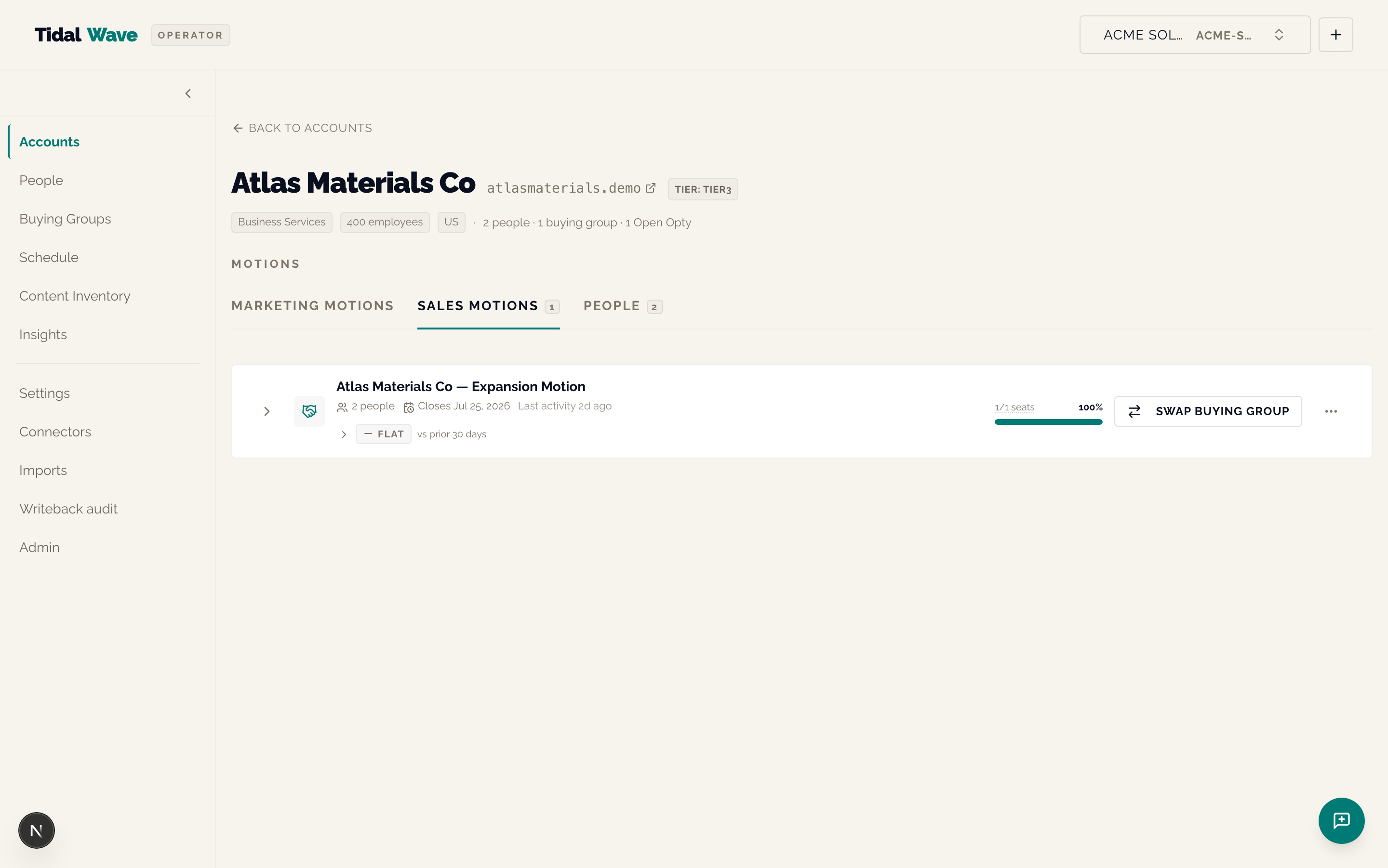
The headline ABM view. Hero strip at top, then the Motions surface as three tabs.
Hero data points
- Account name, domain, tier badge
- Industry / employee count / country chips
- Roll-up:
N people · N buying group · N Open Opty - External IDs (HubSpot CompanyID, SFDC AccountID — when known)
- A bell icon with a red badge when there are newly-closed opportunities awaiting your lifecycle choice (do these convert to a marketing motion? archive? keep as-is?)
The three tabs
| Tab | What's in it |
|---|---|
| Marketing motions (default) | Cross-deal marketing playbooks — usually one per account |
| Sales motions | One per opportunity — open + closed-won + closed-lost |
| People | Every person at the account in a table — Person · Title · Buying group · role · Channel affinity · Last engaged |
What you see per motion row
- Motion name (e.g. "Atlas Materials Co — Expansion Motion")
- Type badge (
opportunity/marketing) - People count, "Closes Jul 25, 2026" (when opportunity-anchored), "Last activity 2d ago"
- A seat-coverage bar:
1/1 seatsfilled = 100% (green); empty seats render as gray segments. The math isdistinct filled roles ÷ total roles, served byGET /v1/accounts/{id}/motionsascoverage_pct. - The Traction badge (Trending up / down / flat / nothing if cohort floor isn't met)
- A "View seats" CTA — expands a seat grid with each role filled in (or empty)
- A "Swap buying group" CTA — opens a dialog that reassigns the account's active buying-group template
When you click "View seats" the motion expands to show:
- Seat grid — one row per role; each shows who's seated, their title, their Next-Up theme + suggested date + channel hint
- Topic-coverage heatmap — seats × themes; cells colored
consumed / queued / gap - Channel × Content ribbon — a compact Sankey beside the heatmap showing how each seat's channel arrivals flow into consumed themes
Hidden context
- The "Sales motions" tab used to be called "Active opportunities" — renamed 2026-06-10 because closed-won/lost deals appear there too.
- The People tab is part of the Motions surface (not a separate section above it). Switching tabs collapses any expanded motion.
- The bell icon does NOT auto-fire the OpportunityClosedPrompt — the old v1 version did and felt intrusive. You click the bell to open it.
- Swapping a buying group from a motion row triggers the same SwapDialog as the standalone account-page swap CTA — the dialog operates on the account-level assignment, not the deal-level anchor.
People — /people
Every person we know about for this tenant. Search by email, attribute, or external ID.
Table columns
| Column | What it shows |
|---|---|
| Lowercased — the dedupe key when external_id isn't present | |
| Attributes | Free-text summary string from your CRM |
| Channel affinity | Two-axis chip: eng · {channel} + promo · {channel} — pulled from the current predictions row |
| Engagement events | Count, clickable — drills to /people/[id]?tab=content |
| Channel touches | Count, clickable — drills to /people/[id]?tab=channels |
| Created | Short date |
Hidden context
- Whole row is clickable; the two count cells get the click first and route to the right detail-page tab.
- The Channel affinity chip shows two axes because Inbound and Promotional are independent predictions — a person can arrive via organic search and respond best to LinkedIn.
- Page size 25. View-layout persona dispatch swaps the body layout for non-generalist personas (e.g.
salessees a different default sort).
Person detail — /people/[id]
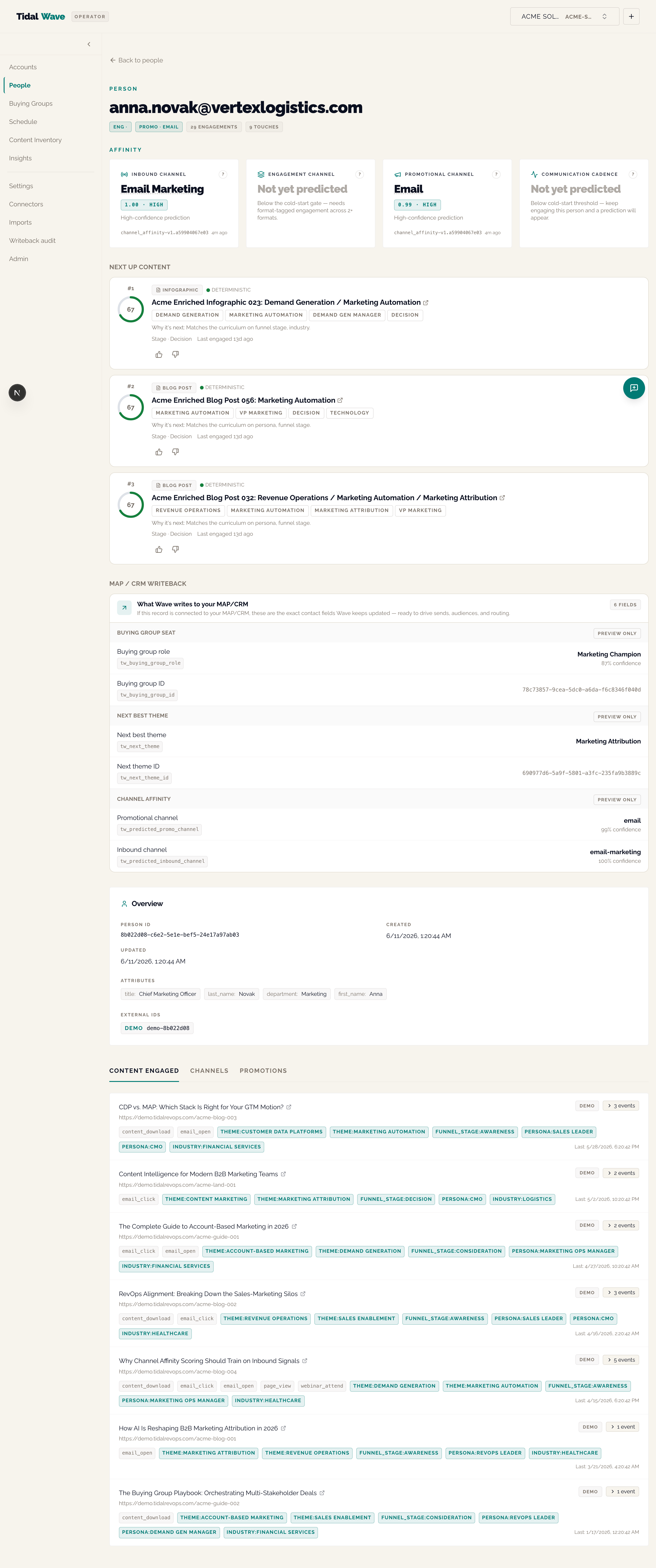
The richest page in the platform. Five blocks, top to bottom.
Block 1 — Header strip
Email, channel-affinity badges (Inbound + Engagement axes), engagement/touch counters, AccountSourceOverrideNote (when the email-domain match disagrees with the HubSpot Company association — HubSpot wins), and an ExperimentArmBadge when the person is part of an active AI Lift Experiment.
Block 2 — AffinityPanel (the 4-card hero band)
Four cards in locked order:
- Inbound Channel (e.g. "Email Marketing") — how they arrived. Driven by
predictions WHERE product='channel_affinity'. - Engagement Channel (e.g. "Not yet predicted") — content format they consume. Driven by
predictions WHERE product='engagement_channel'. - Promotional Channel (e.g. "Email") — outbound vehicle that lights them up. Same
channel_affinityprediction as Inbound but the other axis. - Communication Cadence (e.g. "Not yet predicted") — preferred time-of-day window + cadence in days. Driven by
predictions WHERE product='cadence_affinity'.
Each card carries the predicted value, a confidence score, and the provenance (deterministic vs AI vs client-asserted). When the per-tenant affinity_rings_enabled flag is on, the cards restyle to Option 2 ring-band: each card shows a left-side ConfidenceRing (outline-fill = confidence, color = provenance), the predicted value on the right, and a "Why" disclosure inline.
"Not yet predicted" means the cold-start gate hasn't cleared yet — either insufficient signal (e.g. Engagement Channel needs ≥5 format-tagged events) or the predict-side flag isn't on.
Block 3 — Next Up Content
Top-3 ranked content recommendations as a stack of cards. Each card carries:
- ConfidenceRing colored by provenance — green for
deterministic(driven by buying-group curriculum), amber forlearned(driven by the person's own engagement history) - Format badge (webinar, video, blog post, …)
- Deep-linked title + summary excerpt
- "Why it's next" sentence — explainer keyed off the provenance
- Theme tags for the asset
- Funnel stage + last engagement recency
- Thumbs feedback control — thumb up / thumb down posts to
POST /v1/people/{id}/next-up-content/feedback(best-effort, swallows errors)
A person whose recs blend both sources shows a mixed-color card stack (each ring is single-provenance — there's no "mixed" ring within one card).
Cold-start state (no centroid built yet) — the section is empty rather than rendered with placeholders.
Block 4 — Writeback preview ("What Wave writes to your MAP/CRM")
The exact contact-property name/value pairs Wave would push to HubSpot for this person right now, organized by writeback kind:
- Buying group role (e.g.
tw_buying_group_role= "Marketing Champion",tw_buying_group_id= "…") - Next theme (e.g.
tw_next_theme= "Marketing Attribution",tw_next_theme_id= "…") - Promotional channel (e.g.
tw_predicted_promo_channel= "email") - Inbound channel (e.g.
tw_predicted_inbound_channel= "email-marketing")
Each row carries a Live or Preview only badge — when the writeback flag for that kind is OFF, the row renders as "Preview only" so you can see what Wave would push without actually pushing it. Suppressed people render values with an amber withheld notice.
Block 5 — Overview + tabbed history
- Overview card — Person ID (mono), Created / Updated, Attributes (chip grid), External IDs per source
- Tabs:
- Content engaged — every content asset this person has touched, with tags
- Channels — channel-touch breakdown + recent raw touches
- Promotions — outbound sends to this person, plus a "Log a send" panel for operator-entered records
Hidden context
- The two heavy tab queries (
contentandchannels) are lazy — only fired when the tab is active. - Legacy URL params
?tab=eventsand?tab=touchesare accepted and rewrite tocontentandchannels. - For people in a
suppressed_holdoutexperiment control arm, the ExperimentArmBadge reads "Control" with both glyph + text + aria-label — never color-only. - The Next Up Content section IS visible above the tabs (not behind one) — it fires on mount.
Buying Groups — /buying-groups
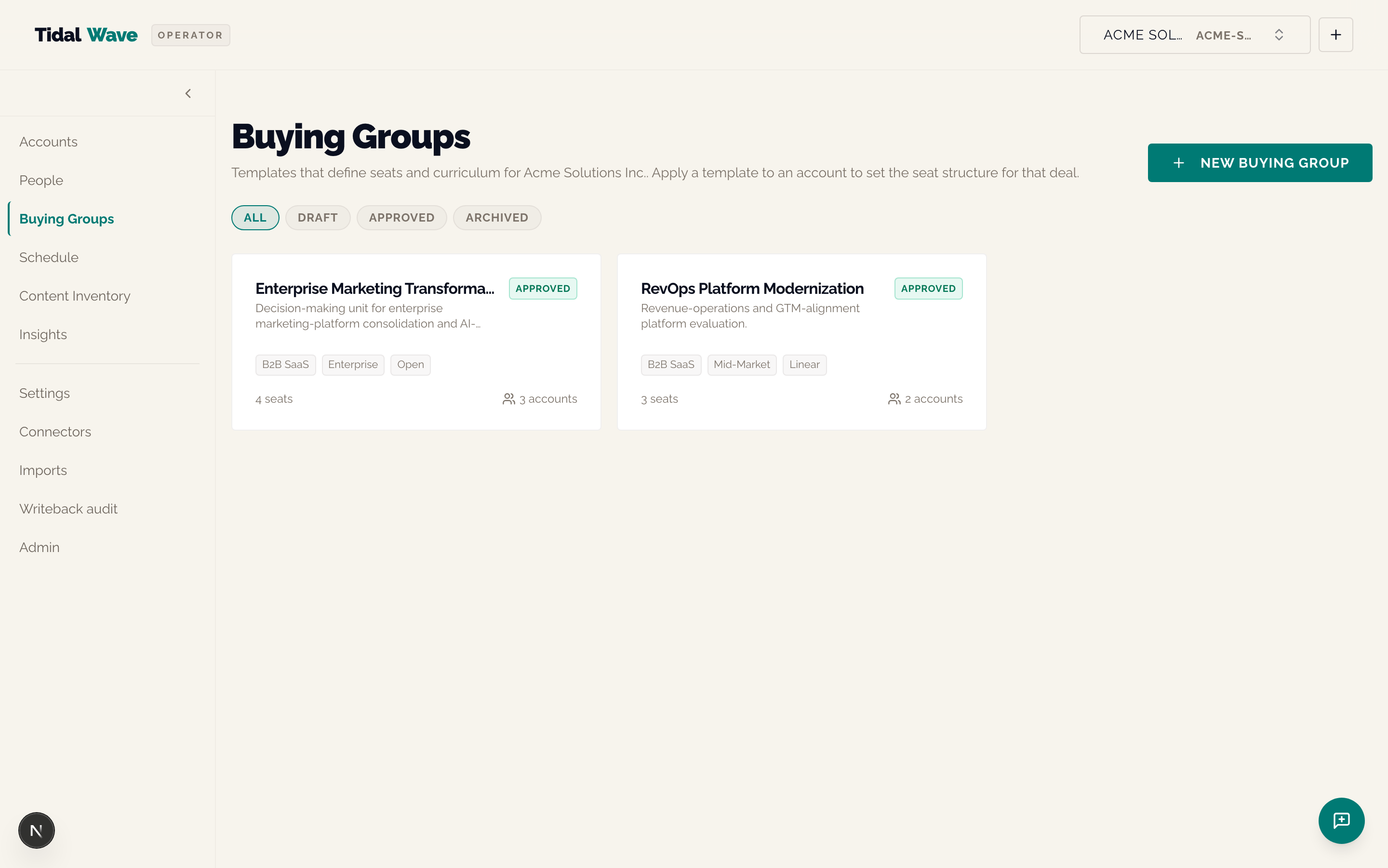
Templates that define the static shape of a buying motion. Card grid; filter by status (Draft / Approved / Archived); "+ New" creates a draft.
Per-card data points
- Name, industry, segment, status badge
- Role count, account count
Hidden context
- Spec ceiling ~100 templates per tenant — no pagination yet.
- A buying group is a template until it's seated against an account; the same template can be reused across many accounts.
Buying Group detail — /buying-groups/[id]
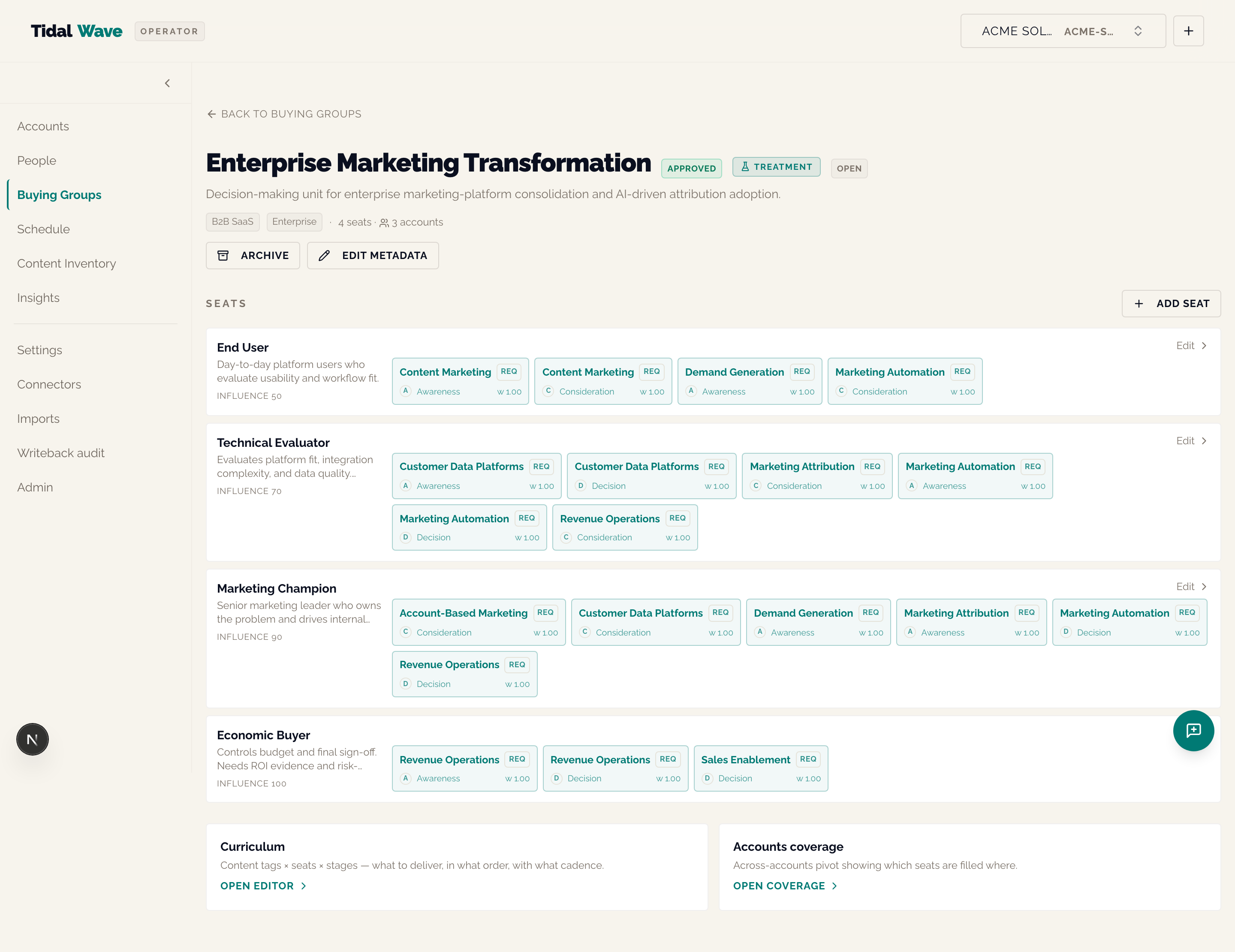
Edit one template. Hero with status state machine (Draft → Approved → Archived), Seats list, quick links to Curriculum + Across-accounts coverage.
Sections
- Hero — name, status badge, sequence-mode badge, description, industry/segment chips, role + account count, primary CTA (Approve / Archive / Restore based on status)
- Seats (the heart of the page) — ordered by influence (End User, Technical Evaluator, Marketing Champion, Economic Buyer, …). Each row carries:
- Role name + influence weight
- Persona signal (with persona picker via lucide
UserCirclein the edit sheet) - Curriculum strip — colored chips per stage (A=Awareness, C=Consideration, D=Decision, E=Expansion) with the theme name and a stage marker like
REQ(required) - Edit CTA per row
- + Add Seat button (top right of seats)
- Footer cards — Curriculum (link to
/buying-groups/[id]/curriculum) and Accounts coverage (link to/buying-groups/[id]/accounts)
Hidden context
- Seat-delete CASCADEs curriculum + assignments — surfaced with a confirm step in the editor sheet.
- The
persona_tag_idFK tocontent_taxonomyis what powers Tag-Ranking v1a's persona signal — if you don't pick a persona for a seat, the ranker can't use the signal. - Stage abbreviations: A = Awareness, C = Consideration, D = Decision, E = Expansion.
Across-accounts coverage — /buying-groups/[id]/accounts
Inverse of the seat grid — given one buying group, show every account where ≥1 person is assigned. Rows = accounts, columns = roles, cells = filled (green dot) / empty (gray dot), right-hand coverage % column. Sorted by coverage % descending.
Per-seat rank-breakdown drill-in — /buying-groups/[id]/seats/[seatId]
Always-visible RankBreakdownCard for one seat's current Next-Up recommendation. Shows matched signals, missed signals, candidate pool size, score, and a per-signal row for persona / funnel-stage / industry. The industry row is hidden when the per-tenant theme_queue_ranker_industry_signal_enabled flag is off (useful for tenants with sparse accounts.industry data).
Schedule — /schedule
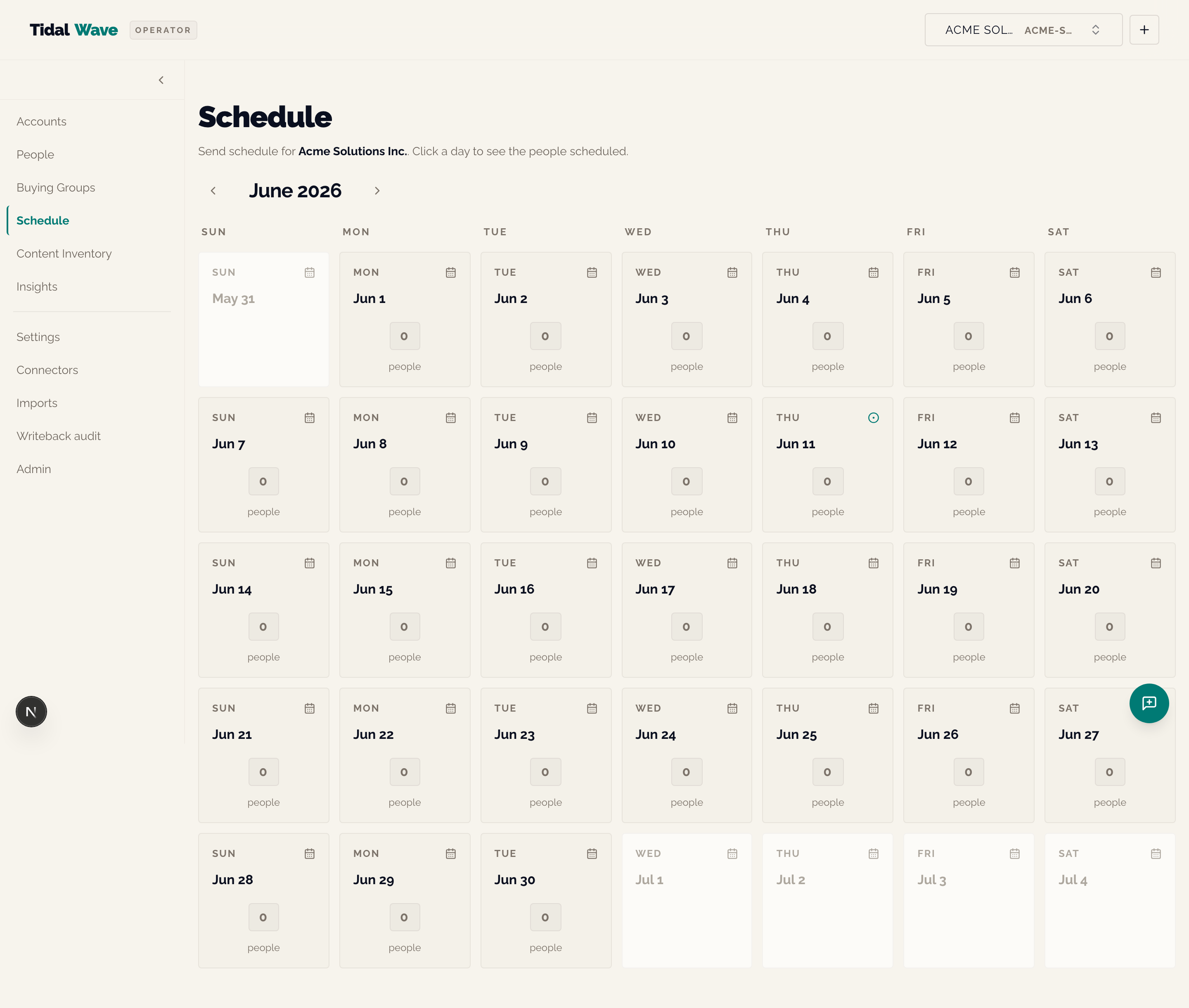
Send-Schedule Calendar. Literal current-month view, Sunday-first 7-column grid. Prev / next chevrons advance selectedMonth. Click any day to see who's scheduled to be touched that day.
What you see
- Per-day aggregate-people count
- Today-marker accent dot (only when the displayed month = current month)
- Previous- and next-month spillover cells are grayed-out (~60% opacity)
- Drill-in grid (when you click a day) caps at 100 rows; the
total_countfield tells you if more were hidden
Hidden context
- Available to every tenant — Decision 23 (2026-05-22) retired the per-tenant
send_schedule_calendar_enabledflag. - Always sends explicit
from/toparams equal to the 1st and last of the displayed month — no rolling 30-day window. - This is the read-side of Cadence Affinity + Buying Groups — it tells you what the platform thinks the next-touch date should be for everyone in scope. It does NOT send the touch itself.
Content Inventory — /content-inventory
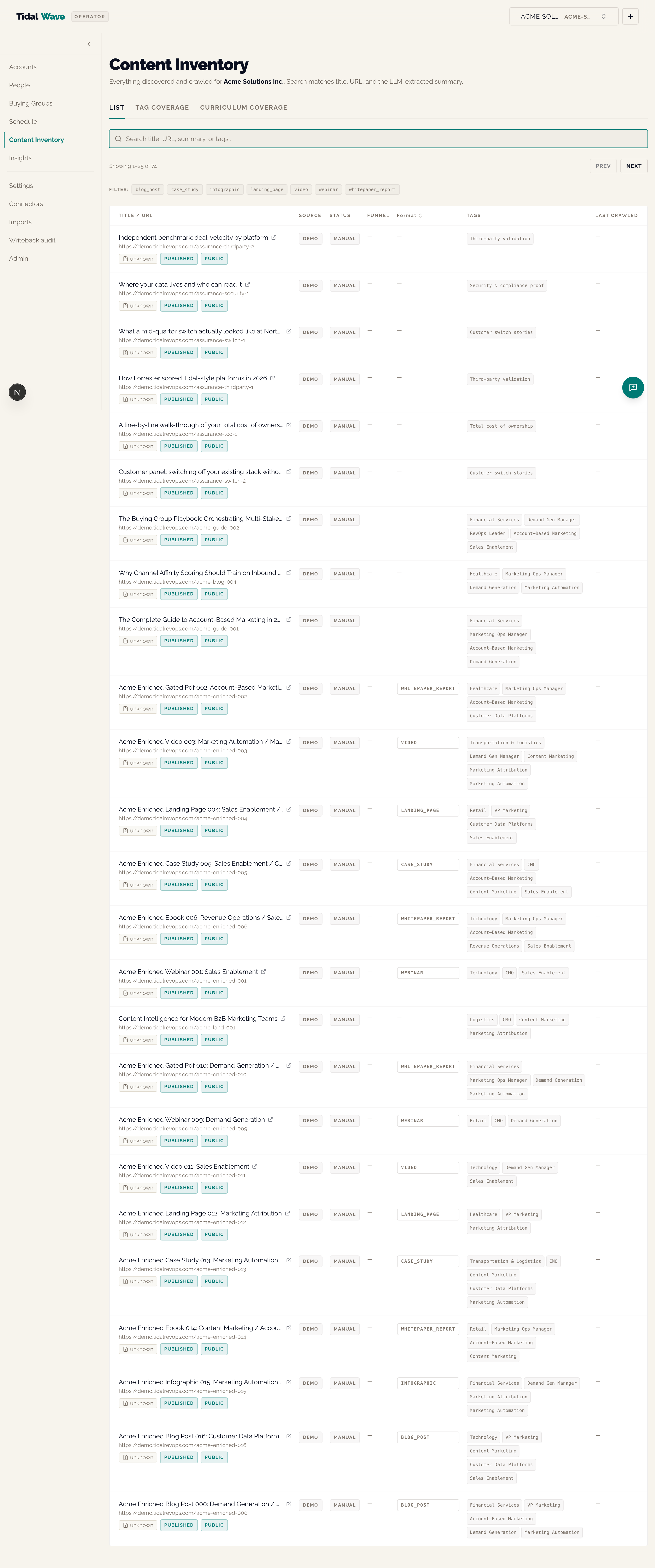
Per-tenant content library. Three view modes via tabs: List · Tag coverage · Curriculum coverage.
List tab (default)
Search input, paginated card/table view. Each asset row shows:
- Title, URL, summary excerpt
- Classification badges —
published_state/gating_state/access_scope - Media type chip
- Format badge (when extracted)
- Tags (themes / personas / funnel-stages / industry)
Tag coverage tab
Family dropdown picker (Themes / Personas / Funnel stages / Industries / Formats). One tile per label in the family showing:
- Count of distinct content pieces tagged with it
- "Engaged via" breakdown of
engagement_events.event_type(distinct content pieces per engagement format — so "Webinar registration: 5 pieces, Blog read: 12 pieces, …")
Curriculum coverage tab
Role × stage matrix for one buying group (default = most-recently-approved). Each cell is colored:
- Green (≥80% covered) — required themes for this role at this stage are mostly tagged in content
- Amber (40–79%) — partial coverage
- Red (<40%) — gap
Each cell shows covered/required count and is a role="meter" for accessibility. Per-cell click instrumentation fires (PII-safe — only role_id + stage, never role_name).
When the per-tenant charts_enabled flag is on (Pilot A), the matrix swaps to a CoverageHeatmap — same data, Recharts ScatterChart with custom rect shapes colored by threshold tokens, plus a visually-hidden <table> AT-accessible twin.
Hidden context
- Tab state is local-only (not URL-encoded). If you refresh, you go back to the List tab.
- Three empty states for Curriculum coverage: (1) no approved groups, (2) group has no curriculum, (3) curriculum exists but no content is tagged.
- The Tag coverage's "Engaged via" breakdown treats
engagement_events.event_typeas the format (since content assets carry no intrinsic format column before Content Intelligence runs).
Content asset detail — /content-inventory/[id]
Per-asset title, URL, summary, tags, classification badges. Home for the LabelExtractionFab (Phase 4 of the eval harness) when eval_harness_enabled is on — operator-driven label capture for the LLM extraction eval.
Insights — /insights/*
Three live-data chart pages under a shared sub-nav. The bare /insights redirects to /insights/buying-group-coverage.
/insights/buying-group-coverage — Seat × topic heatmap
For one buying group, rows = active seats (influence-ordered), columns = group's curriculum themes, cells = consumed (most-recent engagement date) / queued (live theme-queue row) / gap. Group picker defaults to most-recently-approved group. No sandbox mode — the heatmap has no what-if editor.
/insights/channel-content — Channel × content Sankey
Live Sankey of arrival channels → consumed topics. Window selector (30 / 90 / 180 / 365 days). Flow values = distinct people, modal-channel attribution (each person counted only against the channel they most often arrive through). Live/Sandbox mode toggle — sandbox re-opens a what-if matrix editor seeded from live numbers (React-state only, never saved; amber pill in the header).
/insights/taxonomy-coverage — Supply-vs-demand treemap
Live treemap over the tenant's content taxonomy:
- Tile size = content count (supply)
- Tile color = engagement-per-piece scaled 0–100 against the hottest tag (demand)
- Family filter dropdown (Themes / Personas / Funnel stages / Industries)
- Live/Sandbox mode toggle
Per-tile values: name, asset count, demand value, engagement events count. Zero-asset tags are hidden from the treemap (a 0-sized tile can't render) but counted in the sandbox editor.
Hidden context
- These three pages are the highest-information surfaces in the platform — they sit on top of the same
predictions+engagement_events+content_taxonomydata the per-person pages use, but at tenant scale. - The "Sandbox mode" never persists to the database — it's a pure what-if editor over the live numbers.
Settings — /settings
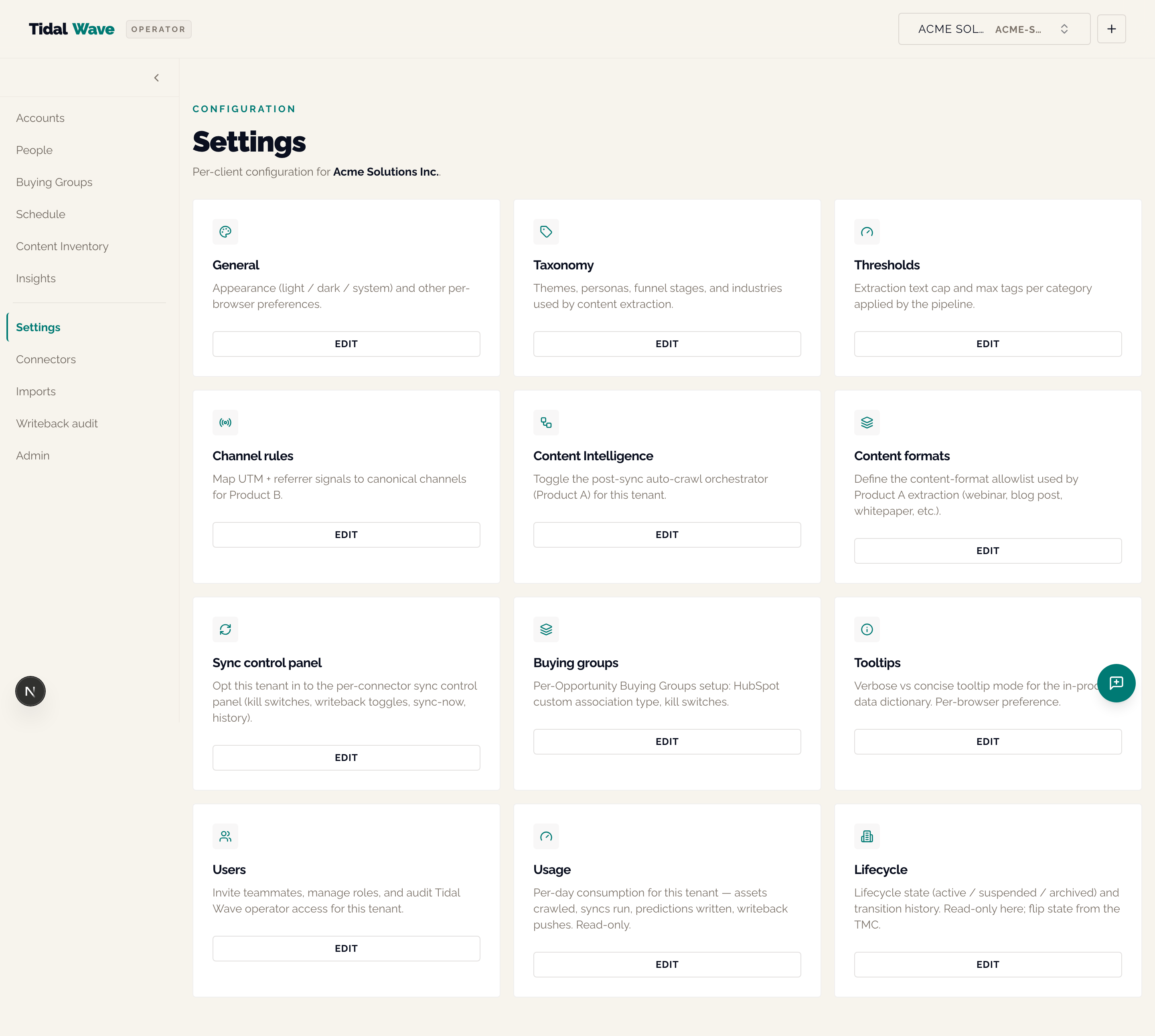
Card grid linking to every per-tenant settings sub-page. Cards in order:
| Card | Sub-page | What you configure |
|---|---|---|
| General | /settings/general | Theme preference (light / dark / system); per-browser only |
| Taxonomy | /settings/taxonomy | Themes / personas / funnel stages / industries used by content extraction |
| Thresholds | /settings/thresholds | Extraction text cap + max tags per category |
| Channel rules | /settings/channels | Per-touch classifier rules — UTM + referrer → canonical channel |
| Content Intelligence | /settings/content-intelligence | Auto-crawl toggle + last-run readout + Embeddings status |
| Content formats | /settings/content-formats | The 11-slug content-format taxonomy (per-tenant editable) |
| Sync control panel | /settings/connectors | Opt this tenant into the per-connector control panel |
| Buying groups | /settings/buying-groups | Per-Opp BG kill switches + HubSpot association setup checklist |
| Tooltips | /settings/tooltips | Verbose vs concise tooltip mode (per-browser) |
| Users | /settings/users | Per-tenant user management (Customer team + TW team tabs) |
| Usage | /settings/usage | Per-tenant consumption readout (never cost) |
| Lifecycle | /settings/lifecycle | Lifecycle state readout (TMC owns the flip) |
Taxonomy editor — /settings/taxonomy
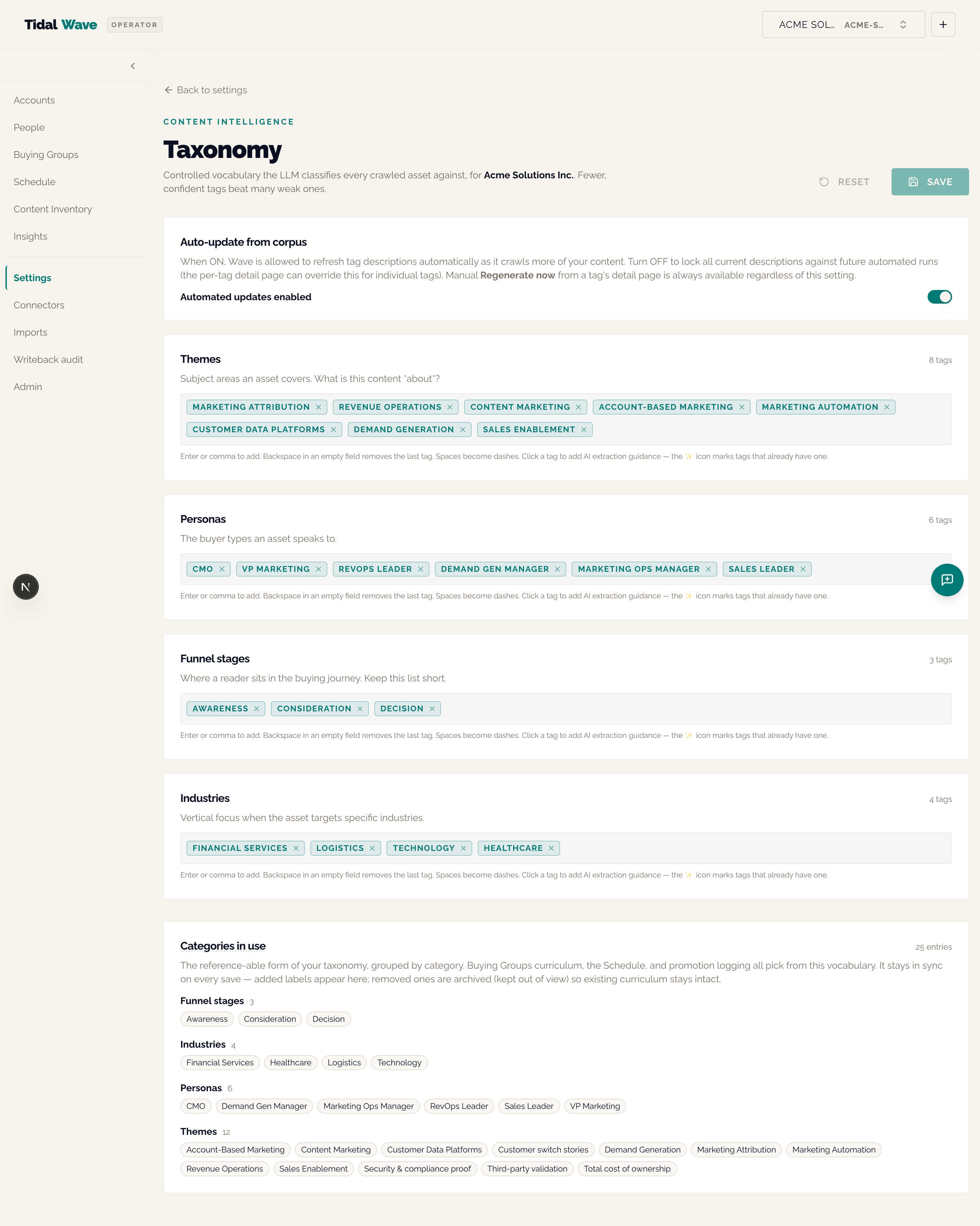
Edit the four-family taxonomy that drives content extraction:
- Themes (9 defaults: ai, automation, analytics, personalization, compliance, roi, integration, security, customer-experience)
- Personas (7 defaults: marketing-ops, demand-gen, cmo, rev-ops, it-admin, data-analyst, sales-leader)
- Funnel stages (3 defaults: awareness, consideration, decision)
- Industries (8 defaults: saas, financial-services, healthcare, retail, manufacturing, technology, education, other)
A tag with a ✨ has an LLM-generated description. The "Topics in use" read-back card surfaces the synced content_taxonomy table.
Mutability is additive — removed tags soft-archive (the curriculum FK is ON DELETE CASCADE); a re-added tag resurrects its original row ID. Per-tag drill-down at /settings/taxonomy/[category]/[value] lets you edit the LLM description, toggle "strict" mode, and trigger the auto-regeneration flow.
Content formats — /settings/content-formats
Edit the 11-slug content-format taxonomy (webinar, video, whitepaper_report, blog_post, podcast, case_study, infographic, interactive_tool, email_newsletter, landing_page, event_in_person). Add / remove / rename slugs.
Critical: an empty list explicitly disables Engagement Channel scoring for that tenant (the cold-start gate refuses). Renaming surfaces a "Rename only" vs "Rename and queue re-extraction" dialog — existing assets are NOT re-extracted automatically.
This is a mutable-default pattern — distinct from the additive-only channel and content taxonomies. The engagement classifier is per-tenant by construction, so removing a default doesn't corrupt other tenants.
Content Intelligence — /settings/content-intelligence
Per-tenant auto-crawl toggle + inline last-run status readout + Embeddings observability card. When the global VOYAGE_API_KEY is unset and you have a backfill gap, the Embeddings card renders an amber "provider not configured" state.
Channels — /settings/channels
Edit the channel-rules table that maps UTM + referrer signals to canonical channels. Click "Preview" to see how your existing channel touches would re-classify under the new rules before saving.
Users — /settings/users
Two tabs: Customer team (per-tenant customer-side seats with invite + manage CTAs; role-gated for viewer) and Tidal Wave team (read-only operator list — vendor-access transparency default).
Usage — /settings/usage
Per-tenant consumption readout — events ingested, LLM calls made, content crawls, writeback rows. Never shows cost-to-Tidal-Wave by design (Decision 8). Viewer role gets a viewer-friendly explainer BEFORE any backend call.
Lifecycle — /settings/lifecycle
Read-only current-state card (provisioning / active / suspended / deprovisioning / archived) plus a transition-history pointer card surfacing how to find the audit trail. PATCH lives only in TMC (per Decision 5 the per-tenant request path 403s non-active tenants).
Data — /data
A read-only map of everything Wave keeps for the selected customer, table by table, with the actual rows one click away.
The six main entities come first — People, Accounts, Content assets, Engagement events, Outbound promotions, Channel touches — each with a row count. Every other table sits under the entity it belongs to, or under "Other tables". A relationship graph shows which tables point at which (hidden on phones; use the per-table Relationships tab instead).
What you'll do here
- Answer "what does Wave actually hold about us?" during a demo or an evaluation without an engineer.
- Trace a value: open
/data/people, switch to Rows, and see exactly what a sync landed. - Read a table's shape: Columns shows name, type, whether it can be empty, and which column is the key; Relationships lists the tables that link in and out.
Who sees what
- Admin and operator seats see rows (up to 100 per page, Next / Previous).
- Viewer seats see the catalog, Columns and Relationships; the Rows tab is locked.
- Columns that hold secrets (encrypted credentials, token hashes) show a lock badge and are never returned, for any seat.
Hidden context
- Every page of rows you open is written to the audit log as
schema_explorer.rows_readwith the table name and a count — never the contents. Admins can see these at/admin/audit-logs. - The page renders locked until the tenant's Schema explorer flag is on (Tidal Wave staff turn it on in the TMC). A platform-wide pause exists for incidents.
- Demo tenants can browse; the explorer is read-only, so there is nothing to fence.
- Counts on very large tables may read "many": the count is capped at two seconds so a big table cannot stall the page.
Connectors — /connectors
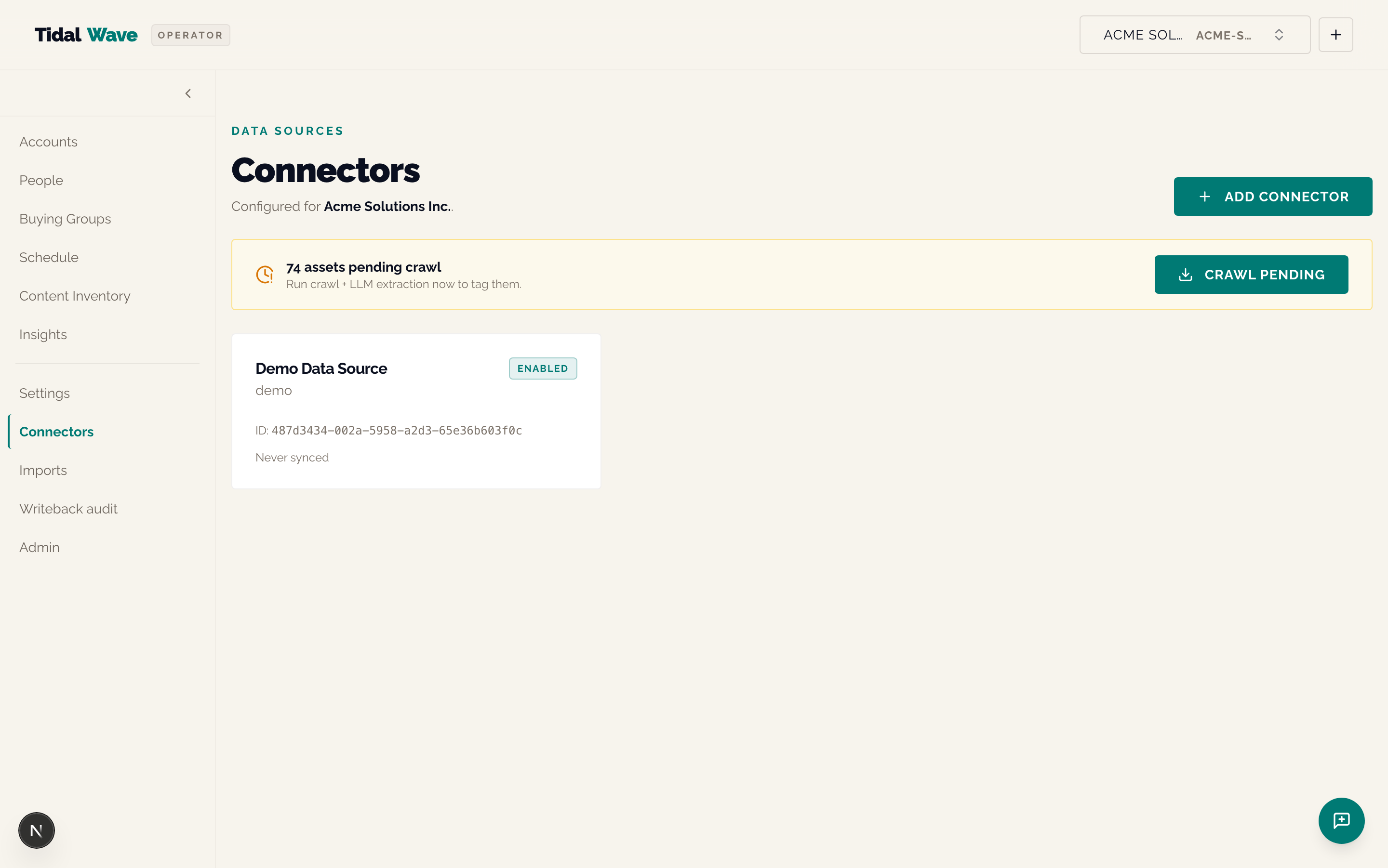
Per-tenant list of installed connectors with install-state badges + Crawl Pending banner.
What you see per connector card
- Connector name (HubSpot, Snowflake, FileSource, Demo, …) + source slug
- Install state badge:
- Active (green) — full grant, ready to sync
- Partial (amber) — some required scopes weren't granted; "Reconnect" CTA shown alongside a missing-scope hint
- Pre-Phase-3 OAuth (no badge) — "scopes not yet verified" — these need a Reconnect-to-verify
- Portal ID (HubSpot only)
- Scope count
- Last sync timestamp (relative)
- Settings link (when the per-connector rollout flag is on)
Above the card grid:
- Crawl Pending banner — when there are
content_assetsincrawl_status='pending'or'manual', a banner offers "Crawl Pending" to drive the LLM extraction - Content Intelligence Status banner — five states:
no_history/healthy/auto_disabled/manually_paused/global_kill_switch. Renders directly below the Crawl banner.
Installing a new connector — /connectors/new
- OAuth connectors (HubSpot today):
<ConnectButton>opens the OAuth dance. Post-install callback redirects to/connectors?installed={source}on success,?install_error=missing_scopeson partial grant. - Credentials connectors (Snowflake, FileSource):
<SchemaForm>with the credential fields. Snowflake takes the RS256 key-pair JWT + view name + warehouse.
Per-connector control panel — /connectors/[id]
Phase 3 surface. Four sections: Health, Sync Now, Sync History (recent sync_runs rows with kind, started_at, finished_at, metrics), Settings (per-connector kill switches, per-kind writeback toggles, OAuth uninstall).
Field mapping (people) — on the HubSpot, Marketo and File Source control panels
Below Settings. Shows how the connected system's fields land on Wave people records: one row per source field with its Wave target, any transform, and a Default or Override badge. Edit opens a side sheet where an admin or operator can add a rule (source field → email, attributes.<key>, company link or timezone), remove one, or type a source field the connector doesn't list yet. Save answers "Saved. Applies on the next sync." — nothing is re-imported; the next incremental sync or Sync Now applies the mapping, and the run's metrics record which mapping version produced it. A rule aimed at suppression status or the identity keys is refused with a red message: those two are never mappable. On demo tenants the Edit button is locked; viewers see the card read-only.
Hidden context
- The HubSpot OAuth uninstall (
DELETE /v1/connectors/installs/{source}) revokes at HubSpot and dual-deletes both theconnector_installsrow and any coexistingclient_connectorsrow. - The
'revoked'install state is reserved for a future audit-trail variant; v1 hard-deletes.
Imports — /imports/new
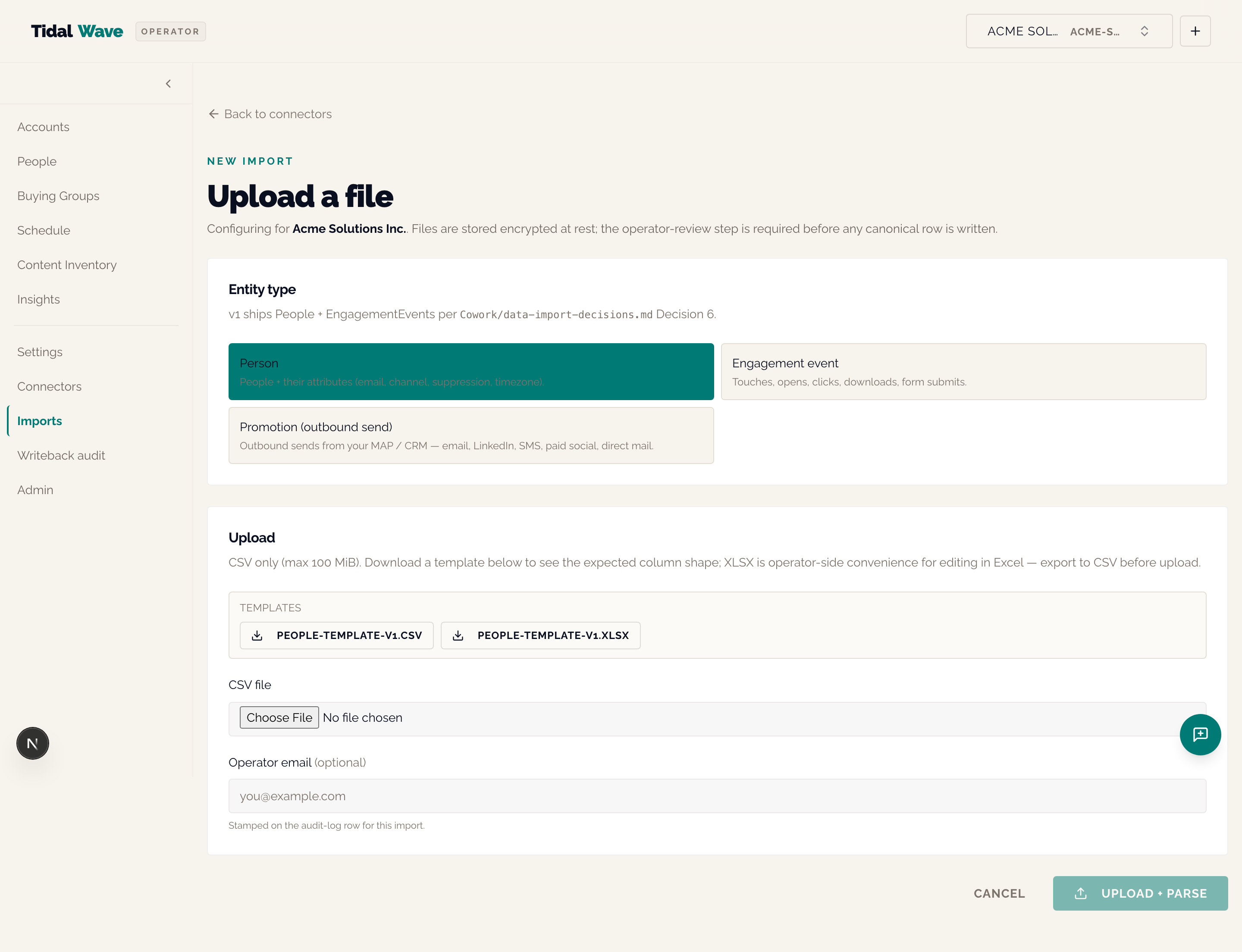
Operator-driven file-import upload. For tenants who can't (or won't) grant live OAuth. v1 entity scope: People · EngagementEvents · Promotions.
Flow
- Pick entity (Person / EngagementEvent / Promotion)
- Upload a CSV (100 MiB cap; non-CSV → 415; missing required columns / invalid UTF-8 / malformed CSV → 422)
- Parser drains rows into a staging table, redirect to
/imports/[id]review surface - Operator-review-and-approve commit gate:
- People / Engagement imports: per-row diff in
<ReviewMatrix>with per-cellLabelExtractionCellFab(label capture for the eval harness). Approve requires explicitapproved_row_indexeslist — NO "approve all" shortcut. - Promotions imports: aggregate review (
<PromotionsReviewSummary>) showing rows parsed / matched / unmatched / channel breakdown / first-25 sample table, plus<BatchApproveBar>with one "Approve all" CTA that opens a Cancel-default-focused confirm Dialog (commit count + dropped-unmatched count).
- People / Engagement imports: per-row diff in
- On approve, canonical writers run (people →
upsert_person, engagement →insert_engagement_events, promotions →insert_promotions) atomically in one transaction.
Templates
Static templates ship at apps/web/public/templates/:
people-template-v1.{csv,xlsx}engagement-template-v1.{csv,xlsx}promotions-template-v1.{csv,xlsx}
XLSX is editing convenience only — upload still rejects XLSX with 415 (your team round-trips via Excel and exports CSV).
Hidden context
- Zero LLM calls anywhere in the import path (Decision 7). Normalization is rule-based — channel, suppression, timezone, email regex.
- Suppression normalization is rule-based forever (Decision 11). A 95%-accurate inference yields a 5% mailable-when-suppressed compliance footgun — so the import path refuses to "guess" suppression state.
- Re-imports are idempotent — dedupe keys are external_id → email fallback (people), source+external_id (engagement),
(client_id, source, external_id)partial unique (promotions). - The parser strips any
client_id/tenant_id/org_idcolumn from operator-supplied files at parse time — RLS isolation invariant.
Writeback audit — /writeback-audit
Per-tenant writeback audit log — every HubSpot PATCH this tenant has issued. Filter by kind / status / contact ID. Per-row Undo for success rows.
Rollback is a new row with previous_value / new_value swapped (append-only history — we never modify an existing audit row). All RLS-isolated on enrichment_pushes.
What's in the table
target_kind—contact_property/theme_queue/role_assignment/buying_group_associationstatus—pending→success/failed/skipped_holdout/skipped_experiment_control/skipped_setup_requiredprevious_value/new_value(full JSON)contact_external_id,created_at,finished_aterror_detail(when failed)
Feedback — /feedback
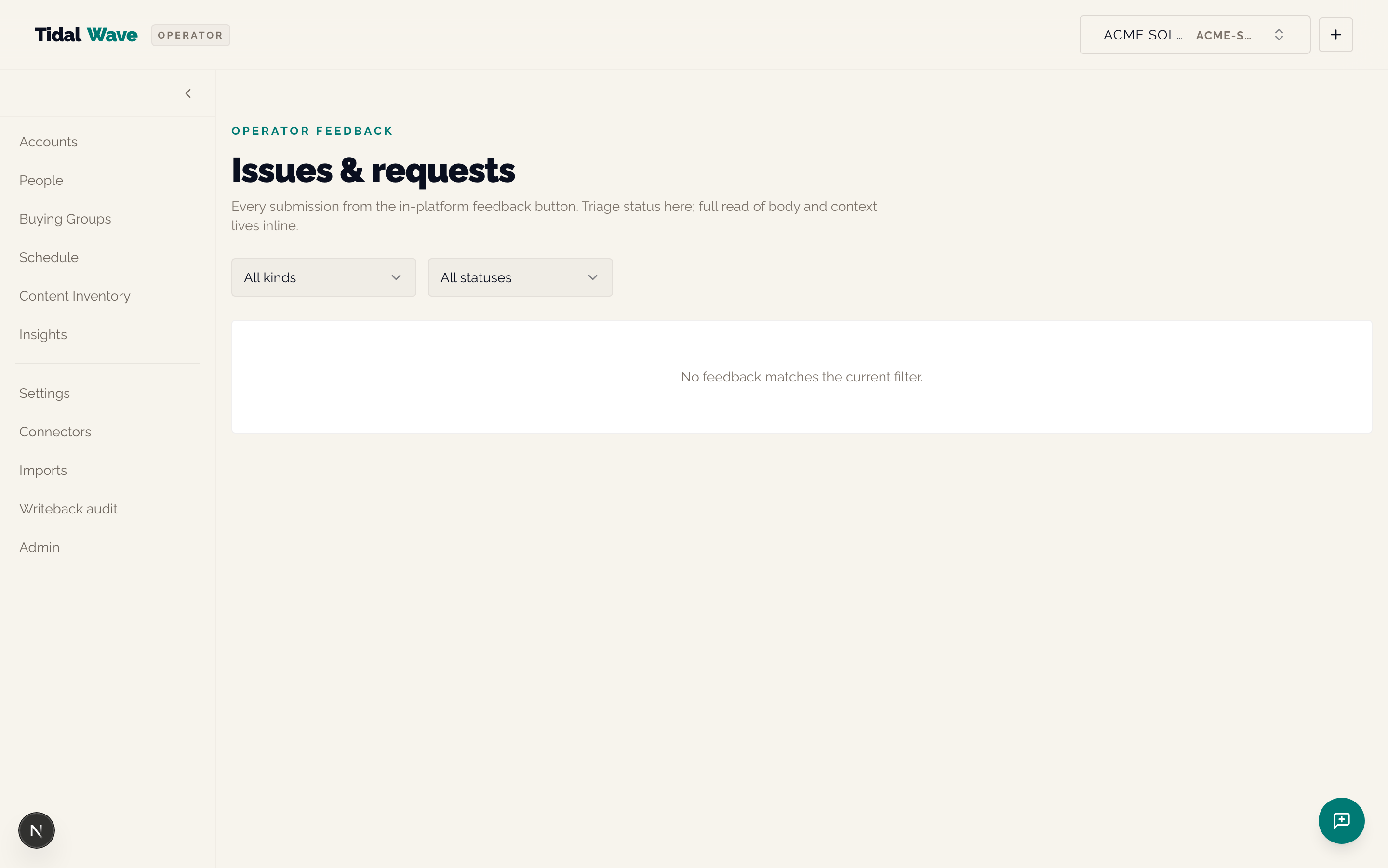
Per-tenant admin list of every feedback submission from the FAB. Filter by kind (issue / feature_request) + status (new → triaged → in_progress → resolved | wont_fix). Inline status flips. Each row shows the body (expandable), reporter email, page context, record context.
Eval — /eval (conditional)
When eval_harness_enabled is on, the side-nav Eval link appears in the TopBar. List view of eval-harness runs; per-run detail page shows the seven Decision-4 dimensions plus per-task tolerance-band pass/fail badges.
Experiments — /experiments (conditional)
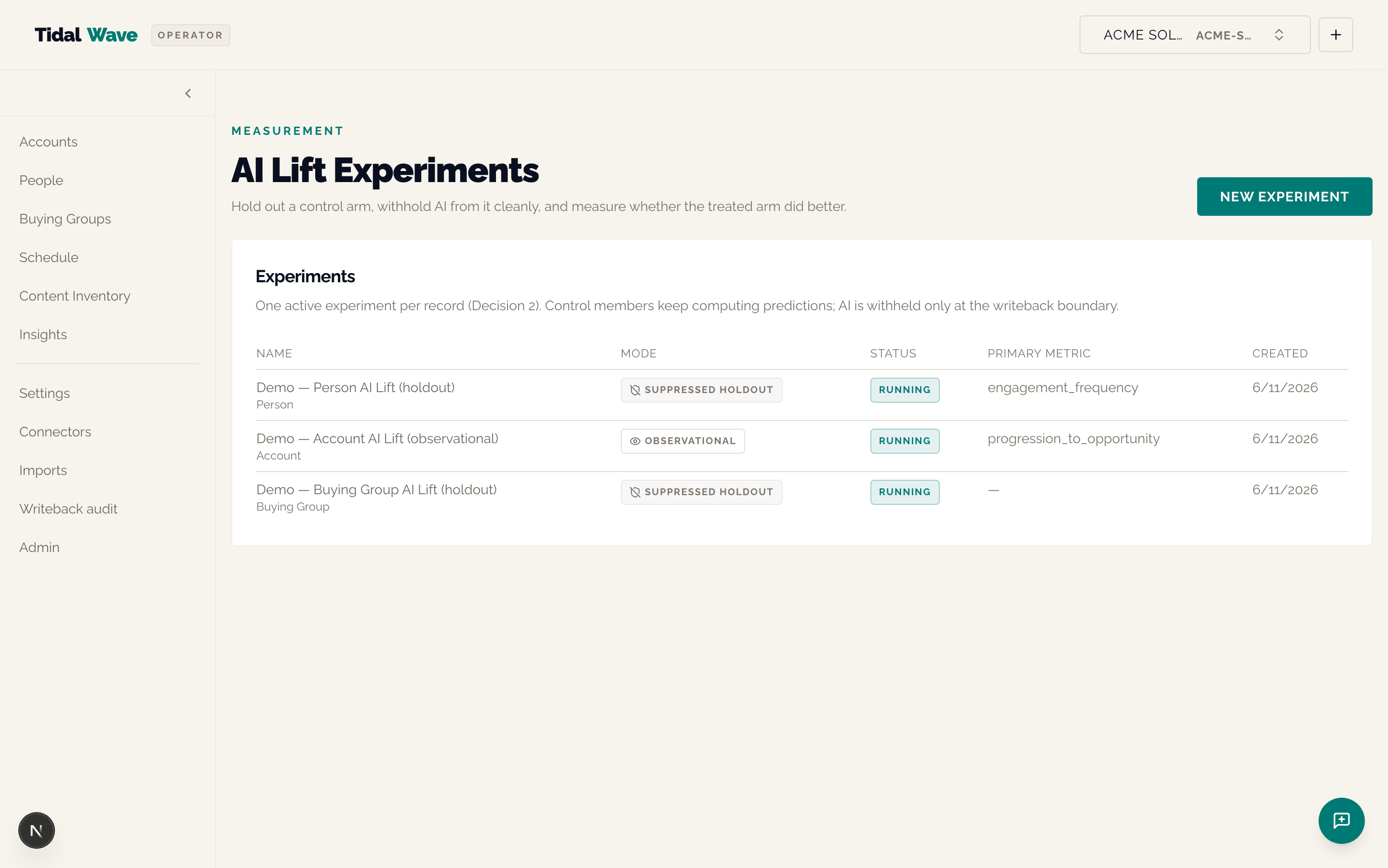
AI Lift Experiments — control vs treatment holdouts. When experiments_enabled is on, the section appears.
What an experiment does
Splits members of an entity type (person / account / buying_group) into control and treatment arms. Control members have AI writeback suppressed at the boundary (predictions still compute — so the counterfactual stays measurable); treatment members get the live writeback. After ≥14 days and ≥30 members per arm, the per-metric lift renders.
List view
Per experiment: name, entity type, mode (observational / suppressed_holdout), status (draft / running / paused / ended / archived), arm sizes, headline lift % (or "Not enough data yet" when the guardrail fires).
Per-experiment report — /experiments/[id]
- Optional lift chart (when
charts_enabledis on) - Guardrail band — visible breach when arms drift apart on a non-target metric
- Per-metric lift table — for each metric in the entity-type catalog, shows control arm value, treatment arm value, lift %, direction (glyph + signed text + aria-label, never color-alone)
Hidden context
- The suppression is at the writeback boundary only — predictions still compute for control members so you can read out a counterfactual.
- Three-layer kill switch:
EXPERIMENTS_DISABLED(subsystem) +EXPERIMENTS_SUPPRESSION_DISABLED(suppression only) + per-tenantexperiments_enabled. - A control member can't be in two experiments at the same entity grain at once — the
uq_experiment_members_activepartial-unique enforces this; the route returns 409 on collision.
The Admin / TMC (Tidal Wave Management Console)
Only visible to Tidal Wave staff. The admin link in the TopBar is gated on the verified caller email being in the TIDAL_WAVE_ADMIN_EMAILS allowlist (via GET /v1/me → is_tidal_wave_admin). Tenant-side admins do NOT see this link.
The TMC carries an amber "Internal portal — Tidal Wave staff only" band at the top and a 12-entry dedicated sidebar.
/admin/tenants — Lifecycle state machine
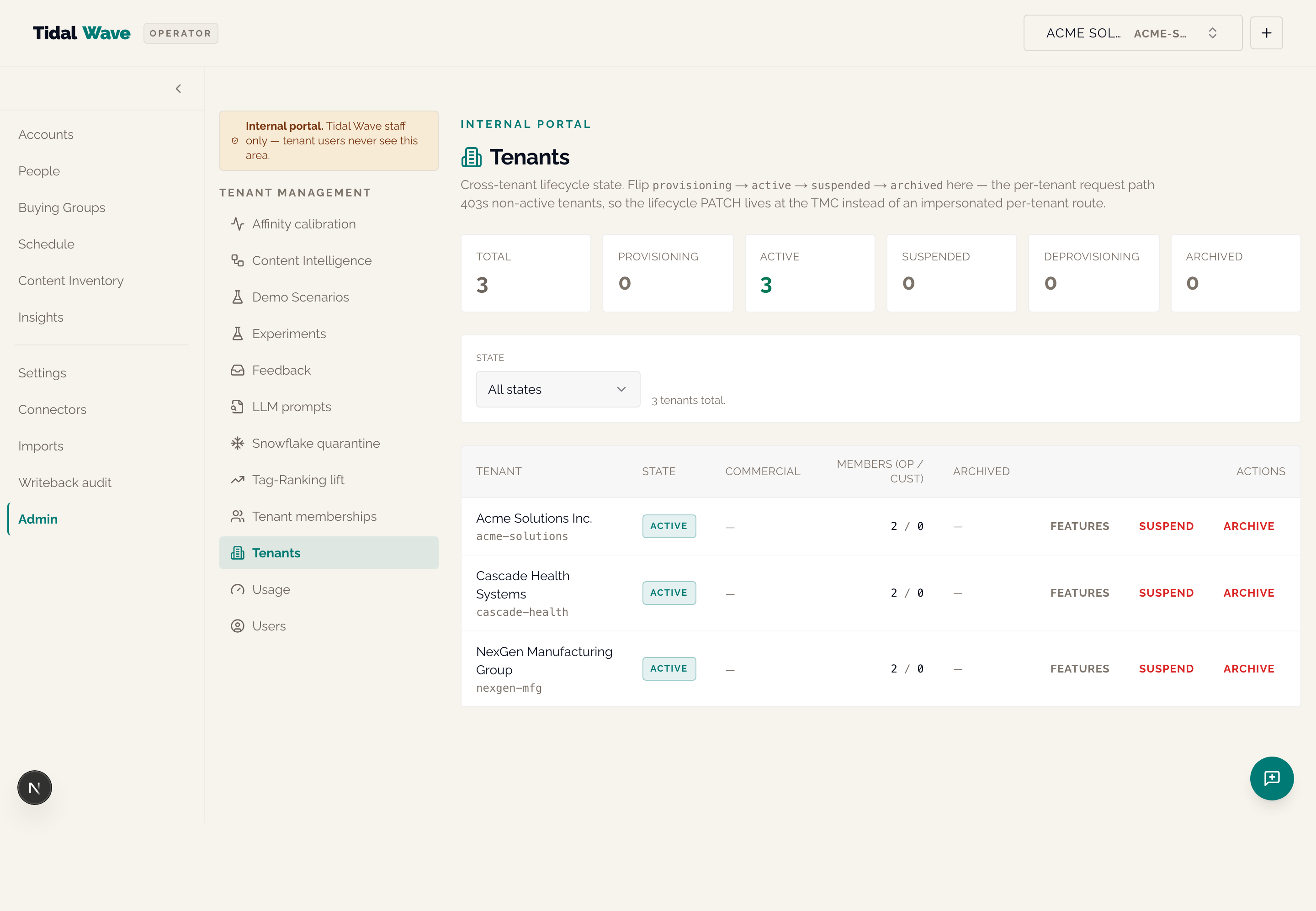
Cross-tenant list of every tenant with state badge, commercial label, member counts. Six-card summary band at top showing counts per state. Per-row affordances:
- Features — opens the FeatureFlagsPanel (every typed per-tenant enablement flag from the catalog with toggles)
- Suspend — flips state
active → suspended(the per-tenant request path will 403 immediately) - Resume — flips state
suspended → active - Archive — flips state to
archivedwith a type-the-slug double-confirm (soft-delete terminal state)
Hidden context
- Boundary enforcement is in
require_authorized_client_id, NOT an RLS policy on every table. clients.stateis re-read on EVERY request — there's no cache. Suspending a tenant during an incident takes effect on the caller's NEXT request.- The Tidal Wave admin allowlist confers membership-check bypass, NOT lifecycle-check bypass — admins flip suspended tenants via the TMC PATCH, not by impersonating per-tenant routes.
/admin/users — Cross-tenant users-aggregated view
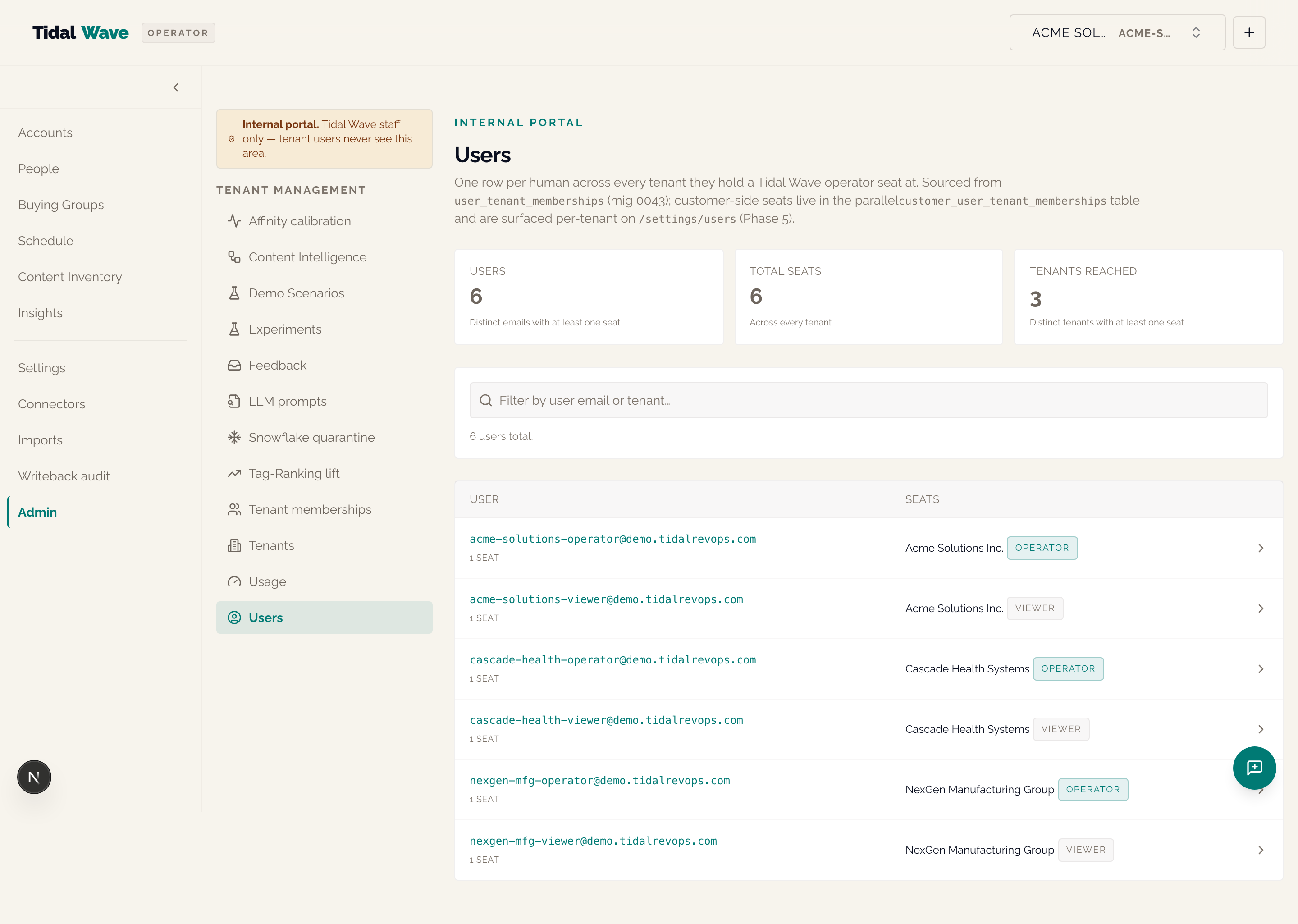
One row per human across every tenant they hold a seat at. Per-user detail page shows:
- Seats card (with per-row Change-role + Revoke; last-admin guard surfaces as 409 toast)
- Audit pointer card for
tmc_alert=impersonation_*log entries - Invite history card (live
GET /v1/invitationsfiltered to the focused user) - Impersonate User button (when caller is a TW admin) — the only entry point for starting an impersonation session
The Person-vs-User distinction (load-bearing)
Person = CRM contact at the tenant's marketing platform. User = operator of the Wave Platform. These MUST NEVER be joined via email — that would create a cross-tenant leak. Refuse at code review.
/admin/content-intelligence — Cross-tenant CI auto-crawl posture
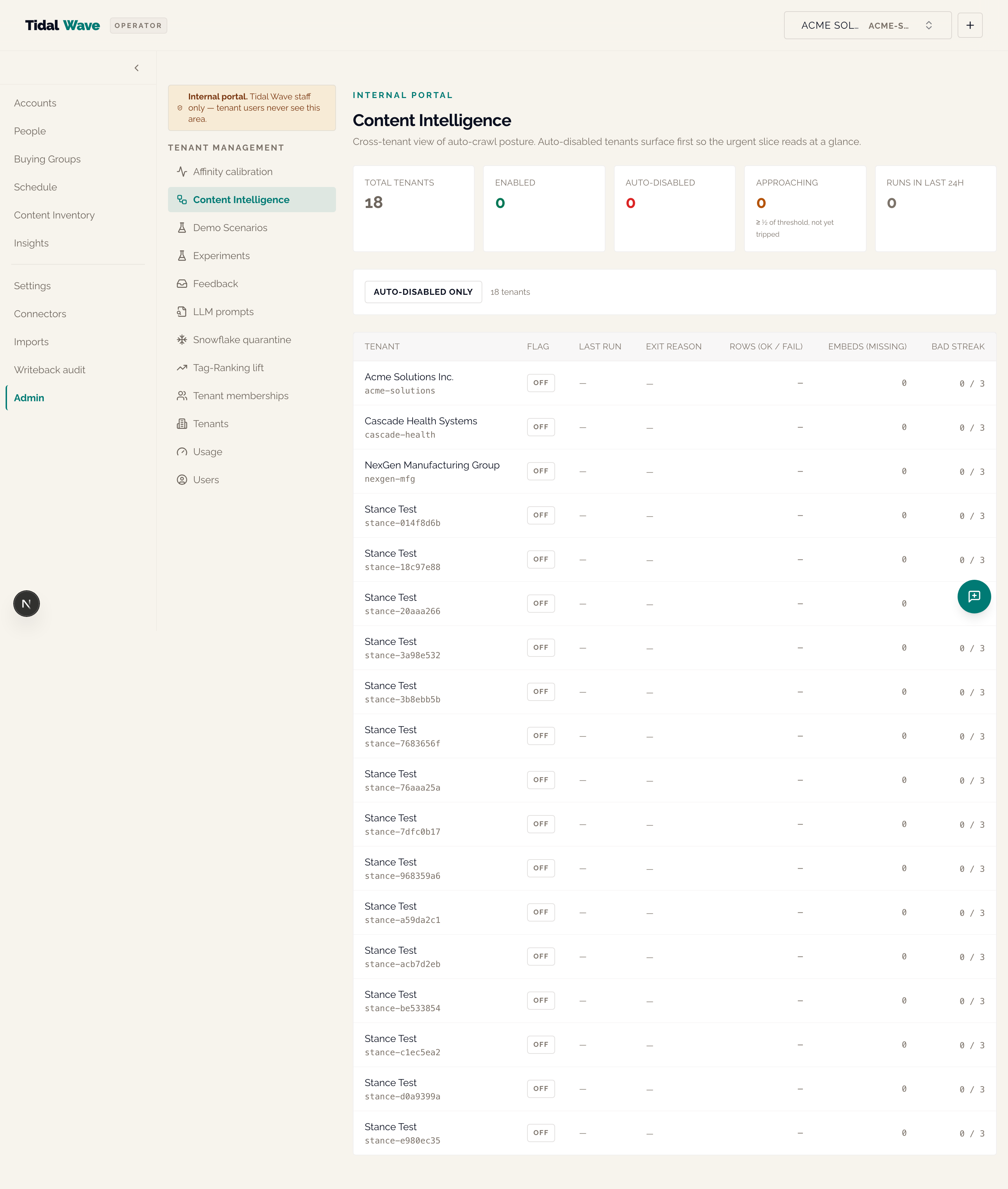
One row per tenant — auto-crawl flag, most-recent CI run, consecutive bad-run streak, failure-rate threshold, embedding backfill remaining. Tenants approaching auto-disable (streak ≥ ⌊threshold/2⌋) surface high in the sort order.
When VOYAGE_API_KEY is unset AND tenants have a backfill gap, an amber "embedding provider not configured" banner renders at the top.
/admin/experiments — Cross-tenant AI Lift rollup
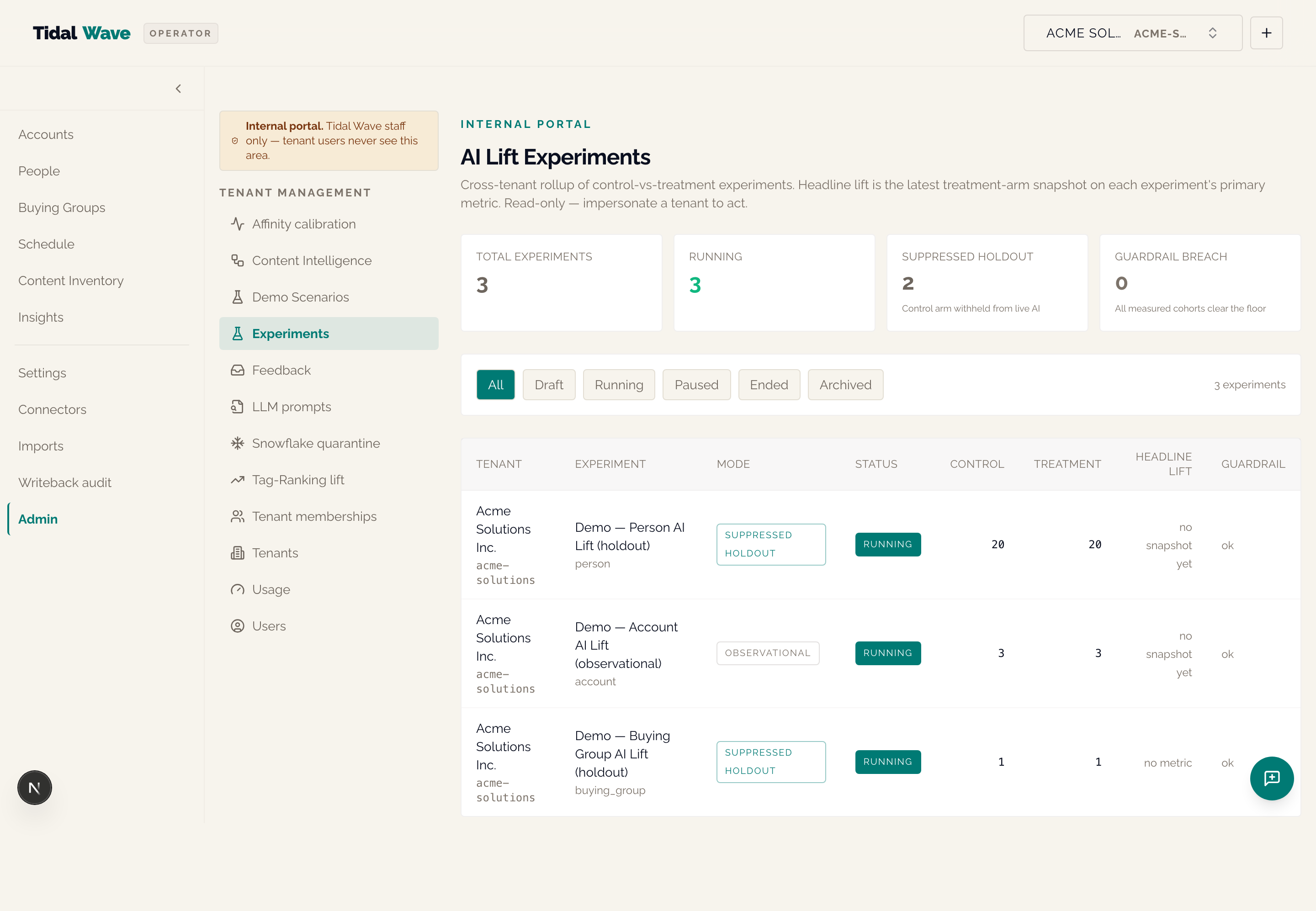
Cross-tenant rollup of every running experiment — arm sizes, headline lift, R2 guardrail flag, days running.
/admin/tag-ranking-lift — Tag-Ranking shadow-run engagement lift
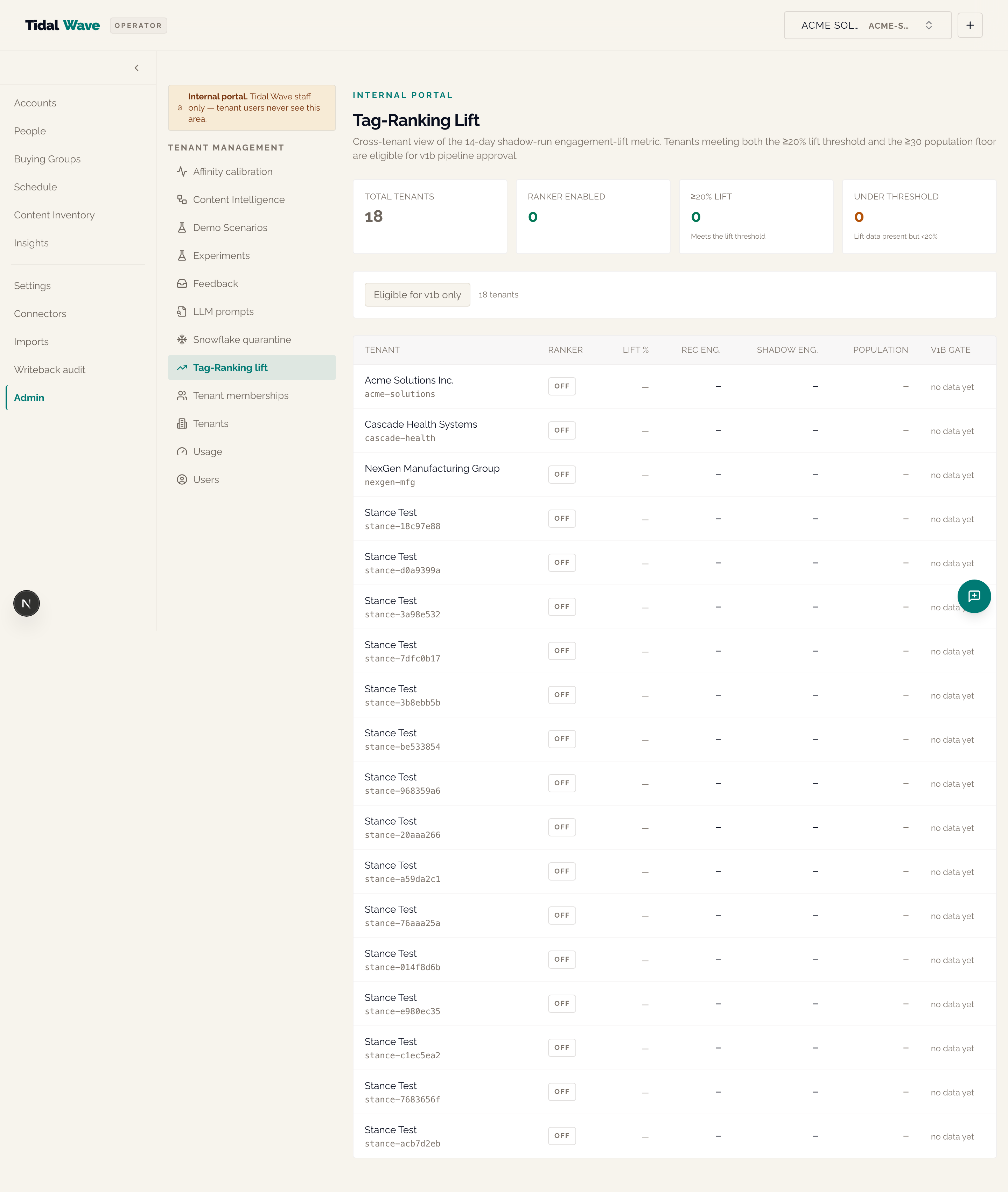
Cross-tenant Tag-Ranking v1a engagement-lift dashboard. Color-coded threshold chip:
- Green ≥20% — meets the v1b graduation gate
- Amber 10–19% — partially meeting
- Red <10% — not yet meeting
eligible_for_v1b badge fires when lift_percent >= 20 AND recommended_population_size >= 30. Operators-only in v1a — not a customer-facing surface.
When NEXT_PUBLIC_CHARTS_ENABLED=true (Pilot B), the page renders a TagRankingLiftBar Recharts BarChart above the existing summary band + lift table — per-bar <Cell> colored by threshold tokens, a ReferenceLine at the 20% v1b gate, opacity 0.35 on bars where recommended_population_size < 30.
Other TMC pages
/admin/feedback— cross-tenant feedback triage/admin/tenant-memberships— cross-tenant authorization review + invite + role management (write affordances added in Phase 4 of User Management Frontend)/admin/llm-prompts— cross-tenant LLM prompt+response audit (PI-7); Fernet-decrypted at read time; redaction sentinels NOT reversible/admin/snowflake-quarantine— stuck identities (unresolved Snowflake rows) cross-tenant for operator support/admin/usage— cross-tenant cost + consumption; per-metric consumption table with inline-SVG sparklines/admin/affinity-calibration— Bayesian-shadow vs GBC argmax agreement readout/admin/demo-scenarios— Demo Experience scenario list + builder + fullscreen runner (for screen-share teleprompter use)
Part 3 — Implementation guide for a new tenant
Canonical sequence moved (2026-09-05). The dependency-ordered operator path is now
Cowork/operational/tenant-onboarding-runbook.md(nine gated stages, tested SQL recipes for the steps the product cannot yet do from a screen, per-stage verification, failure modes, variants), with its gaps tracked inCowork/operational/tenant-onboarding-gap-register.md. This Part is the 2026-06-11 narrative snapshot and is kept for context; where the two disagree, the runbook wins. Two corrections the snapshot needs: the 01:00 UTC scheduled sync performs the one-shot first sync the night of the OAuth install unlessconnector_scheduled_sync_enabledis turned off first, so Steps 4–5 (taxonomies) must precede Step 3 (install); and on a default HubSpot tenant none of the four learned products produces a prediction without the runbook's interim steps.
This is the opinionated path. Follow it in order unless you have a specific reason not to. Each step is explicit about what it touches; each step's "expect" line tells you what to look for before moving on.
Step 0 — Pre-flight checks
Before you provision anything, verify:
TIDAL_WAVE_ADMIN_EMAILSincludes the provisioning operator's email. This is the deploy-config allowlist; without it, the operator can't reach the TMC after provisioning.- Mailer is configured.
MAILER_PROVIDER=resend+RESEND_API_KEY(prod) or MailHog reachable (local).MAILER_DISABLEDis false. - Identity wall is live.
WORKOS_*set (Stage B) ORCLOUDFLARE_ACCESS_*set (Stage A) ORCLOUDFLARE_ACCESS_BYPASS=true(local dev only). - All emergency disables are off. Check
WRITEBACK_DISABLED,EMERGENCY_DISABLE_JWT_VERIFICATION,EMERGENCY_DISABLE_WORKOS,EMERGENCY_DISABLE_EGRESS_ALLOWLISTare allfalse.
Step 1 — Provision the tenant
Run the canonical provisioning script:
docker compose exec api python scripts/provision_tenant.py \
    --slug acme-co \
    --name "Acme Co" \
    --first-admin-email [email protected] \
    --audience tw_operator   # or customer_user
The script is idempotent on clients.slug — safe to re-run if a prior attempt errored mid-flow.
What this does
- Creates the
clientsrow instate='provisioning'(NOTactive— the seed window is observable). - Inserts a
client_settingsrow withfeature_flags = {"invitations_enabled": True}. - Seeds the default content taxonomy (9 themes / 7 personas / 3 funnel stages / 8 industries).
- Seeds the default channel-rules table.
- Creates ONE pending invitation in
user_invitations; mails the magic link. - Flips state
provisioning → active.
What it does NOT do
- HubSpot OAuth install (the operator does this after first login)
- Per-product flag flips beyond
invitations_enabled - HubSpot property registration in the tenant's portal
- Demo seeder data (
scripts/seed_demo_data.pyis local-only, demo tenant only)
Expect
A JSON readout: client_id, slug, state_after='active', created=true, invitation_id, invitation_email. The first admin receives a magic-link email.
Step 2 — First admin accepts the invite + provisions the HubSpot portal
The recipient lands at /accept-invite?token=... (this route is CF-Access-bypassed via JWT_SKIP_PREFIXES — the magic-link token IS the proof of ownership). Four-check defense-in-depth gate fires (token hash → not expired → not revoked → email match); any failure collapses to a generic 403 "invitation not valid."
On success, the user is upserted into users + the audience's membership table, then signs in through WorkOS (magic code) at /login — Cloudflare Access was retired as the app wall on 2026-06-29; only the /accept-invite bypass app remains.
Before installing HubSpot, prepare the portal:
Register these custom contact properties:
tw_predicted_promo_channel(single-select)tw_predicted_inbound_channel(single-select)tw_predicted_engagement_channel(single-select)tw_predicted_send_window(single-select: morning_local / midday_local / evening_local / unspecified)tw_predicted_cadence_days(number)tw_next_theme(text)tw_next_theme_id(text)tw_buying_group_role(text)tw_buying_group_id(text)
If you plan to use Per-Opportunity Buying Groups: define the buying_group custom association type. Without it, the association push will land as status='skipped_setup_required' (NOT failed) and the operator-console will surface a checklist at /settings/buying-groups.
Step 3 — Install HubSpot via OAuth
From the operator console: navigate to /connectors/new, find HubSpot, click <ConnectButton>. The OAuth dance lands at /v1/oauth/hubspot/callback. The callback runs HubSpot's /oauth/v1/access-tokens/<token> introspection endpoint to populate portal_id + canonical granted_scopes, computes the manifest-required-scope diff into missing_scopes, persists install_state ('active' or 'partial').
Expect
- The
/connectorspage shows HubSpot as Active (green) when all required scopes were granted. - If you get Partial (amber) with a missing-scope hint, the Reconnect CTA re-runs the OAuth dance asking for the missing scopes.
Scopes by what they unlock
| Required scope | Unlocks |
|---|---|
content, forms, files | sync_content_assets (the content corpus for Content Intelligence) |
crm.objects.contacts.read, crm.schemas.contacts.read, crm.objects.companies.read, crm.lists.read | sync_people (every paying tier grants these) |
business-intelligence | sync_engagement (Marketing Hub Pro/Ent only — Starter portals land partial here) |
crm.objects.contacts.write | All writeback (push_contact_property, push_theme_queue, push_role_assignment, push_buying_group_association) |
crm.objects.deals.read | sync_opportunities (Per-Opp BGs) |
crm.objects.companies.read | sync_companies (Per-Opp BGs) |
sales-email-read | sync_promotions (CRM live stream; Phase 2 of promotion ingestion) |
Intentionally absent: marketing-email (we're not in the execution business).
Step 4 — Customize content taxonomy (recommended)
Go to /settings/taxonomy and review the 9 / 7 / 3 / 8 defaults. Add tenant-specific themes (e.g. for a fintech: "payment-orchestration", "regulatory-reporting"). The taxonomy is additive — removed tags soft-archive, NEVER hard-delete, since the curriculum FK is ON DELETE CASCADE.
Why first: every downstream prediction (Channel Affinity, Engagement Channel, Buying Groups, Tag-Ranking, Next Up Content) reads from content_taxonomy. Setting it up before sync means the very first LLM extraction is operating against the right vocabulary.
Step 5 — Customize the content-format taxonomy
Go to /settings/content-formats and review the 11-slug DEFAULT_FORMAT_TAXONOMY_V1. This is required before enabling Engagement Channel (Step 11.2) — an empty list explicitly disables Engagement Channel scoring (the cold-start gate refuses).
Renaming a format surfaces a "Rename only" vs "Rename and queue re-extraction" dialog — existing assets are NOT re-extracted automatically.
Step 6 — Initial connector sync
From /connectors, click "Sync now" on HubSpot or wait for the scheduled sync (the orchestrator runs on its connector-specific cadence).
Expect
- A new
sync_runsrow withkind='hubspot'andstatus='finished'. metrics.error_codeshould be unset (ornull).- On the SECOND sync,
metrics.people_relinkedmay populate — that's the orchestrator's post-_ingest_companiesSQL relink running.
DO NOT enable any per-product writeback yet.
Step 7 — Enable Content Intelligence auto-crawl
At /settings/content-intelligence, flip the toggle on. This sets client_settings.feature_flags.content_intelligence_auto_crawl_enabled=true. The next sync's content_assets rows will land in crawl_status='pending'; the orchestrator picks them up 60 seconds after the sync completes, runs crawl + LLM extraction, and writes tags + embeddings.
Expect
- Sync_runs rows with
kind='content_intelligence'andmetrics.exit_reasonin{drained, row_cap_hit, budget_exhausted, kill_switch}. embedding_backfill_remainingshould decrease over runs.- If you see
embedding_backfill_remainingSTAYING ELEVATED withembedding_provider_configured=false, theVOYAGE_API_KEYenv var is unset.
Watch
Three consecutive bad runs auto-disable the auto-crawl (default failure-rate threshold 50% / floor 5 rows). The threshold is per-tenant configurable via content_intelligence_failure_disable_threshold.
Step 8 — Stand up Buying Groups structure
From /buying-groups, click "+ New" to create at least one template. Then:
- Add roles — Champion / End User / Economic Buyer / Technical Evaluator / Marketing Champion / etc. Set an influence weight per role. For each role, optionally set a persona signal (
persona_tag_idFK tocontent_taxonomy) — this is what powers Tag-Ranking v1a's persona signal. - Add curriculum — at
/buying-groups/[id]/curriculum, populate the role × stage matrix with required themes. Each cell is a(role, stage, theme)triple plus a required-vs-hint flag. - Approve the template. Draft templates don't get scored.
Once approved, the hourly **:05 enqueue_buying_group_scoring cron starts populating the theme_queue with (person, theme) rows ranked by who should see what next.
Step 9 — Enable per-product scorers
Each step: flip the predict flag, watch predictions rows accumulate, verify coverage, THEN enable writeback in Step 11.
Step 9.1 — Channel Affinity
Set client_settings.feature_flags.channel_affinity_prediction_enabled=true. Wait for the 03:30 UTC cron. Coverage = predictions WHERE product='channel_affinity' AND is_current / suppression-eligible people.
Step 9.2 — Engagement Channel
ONLY enable once Step 5's format taxonomy is set AND Content Intelligence has populated content_assets.format (you may need to run scripts/backfill_content_assets_format.py to fill the column on the existing crawled corpus). The cold-start gate needs ≥5 format-tagged events per person AND ≥2 distinct formats consumed.
Set engagement_channel_prediction_enabled=true. Daily 03:45 UTC.
Step 9.3 — Cadence Affinity
EU-jurisdiction tenants may keep this OFF pending legal sign-off per Decision 7 of Cowork/cadence-affinity-decisions.md. The product reads Person.suppression_status (operational gate) but never branches on Person.consent_basis (audit-only per Decision 8).
Set cadence_affinity_predict_enabled=true. Daily 02:15 UTC; weekly Monday 04:30 UTC retrain.
Step 9.4 — Next Up Content
Set next_up_content_enabled=true. Lazy person-detail-page surface. Daily 05:00 UTC; weekly Monday 05:15 UTC retrain. Defer the next_up_content_feedback_ranking_enabled sub-flag until operators have provided enough thumbs feedback that the ±0.15 clamp matters.
Step 9.5 — Tag-Ranking v1a
Set theme_queue_asset_ranker_enabled=true. Watch /admin/tag-ranking-lift for the 04:45 UTC shadow-run engagement lift. Industry signal theme_queue_ranker_industry_signal_enabled defaults ON — flip OFF for tenants with <80% populated accounts.industry.
Step 9.6 — Motion Traction
Set motion_traction_enabled=true. Read-only operator surface — the Traction badges on /accounts and /accounts/[id]. Cohort floor 8 accounts before percentile renders.
Step 9.7 — Bayesian Affinity (shadow)
Set affinity_bayes_enabled=true. Shadow-only — never operator-visible. Calibration accrues at /admin/affinity-calibration.
Step 10 — Enable CRM writeback (the CA-R1 second opt-in)
For each learned-prediction product whose predictions look healthy (coverage acceptable, no obvious skew):
| Flag | Pushes |
|---|---|
writeback_enabled.channel_affinity=true | Two pushes per eligible person (promo + inbound) |
writeback_enabled.engagement_channel=true | One push per eligible person (format) |
writeback_enabled.cadence_affinity=true | Two pushes per eligible person (send window + cadence days) |
These three are absent-key-disabled by the CA-R1 carve-out — operators must explicitly opt in. The other writeback kinds (theme_queue, role_assignment, buying_group_association, contact_property) are absent-key-enabled by Decision 7 — they fire on the next scheduled tick if Buying Groups is set up.
Expect
- Within 15 minutes of the scorer cron,
enrichment_pushesrows withstatus='success'. - HubSpot contacts now carry the predicted properties.
Step 11 — Smoke test + sign-off
Visit each surface and confirm:
- Splash
/— both cards render with non-cold-start state. - One person page — AffinityPanel shows all four cards (Inbound, Engagement, Promotional, Cadence). Writeback Preview section shows correct property → value pairs.
- One account page — Marketing motions tab renders with seat-coverage bars.
/admin/content-intelligence— the tenant is inhealthyorno_historystate, NOTauto_disabled.- HubSpot portal — spot-check that ~5 contacts have the writeback properties populated.
Set client_settings.feature_flags.commercial_label to operator-visible metadata (e.g. design_partner, paying). No code branches on it — it's a label.
Optional Step 12 — AI Layer add-ons
Each AI-layer product is independently flag-gated:
ai_explainability_enabled— per-prediction sentencenl_query_enabled— operator NL queries; setnl_query_daily_capif 50 isn't rightai_observations_enabled— nightly anomalies surfaced on the splash cardcontent_qa_enabled— Content Gap Q&Atheme_queue_reasoning_enabled— "why this is next" sentences
Optional Step 13 — AI Lift Experiments
experiments_enabled=true only after at least one writeback product is live for ≥14 days (the default experiments_guard_min_runtime_days). Each experiment needs ≥30 members per arm before lift renders.
Part 4 — Data point reference
Every named metric / badge / status that renders in the operator console, with a one-line definition. When in doubt, the tooltip registry at
apps/web/src/components/tooltips/registry.tsis the source of truth.
Splash card metrics
| Metric | Definition |
|---|---|
| Content Inventory freshness | Count of content_assets known + % successfully crawled + last crawl timestamp |
| Channel Affinity coverage | X of Y people scored (Z%) — Y excludes suppressed people |
Account card / detail
| Metric / badge | Definition |
|---|---|
| Tier badge | Operator-set account tier (TIER1 / TIER2 / TIER3) |
| Traction verdict | Trending up / Flat / Trending down — derived from the composite of five window-over-window deltas |
| Traction score | Composite signed value in [-1, +1], averaged across the five signals |
| Traction percentile | Rank within the tenant's accounts; NULL below the 8-account cohort floor |
| Seated engagement (signal) | Δ in engagement events from seated people on the motion's buying group |
| Seat fill (signal) | Δ in person_role_assignments.created_at for the motion |
| Multithreading (signal) | Δ in distinct engaged people at the account |
| Inbound touches (signal) | Δ in channel_touches for the account's people |
| Theme progression (signal) | Δ in served+consumed theme_queue rows |
| Seat coverage bar | distinct filled roles ÷ total roles for the motion |
| Open Optys count | Opportunities not yet closed_won or closed_lost |
| Motion (marketing) | Cross-deal marketing playbook anchored to an account; one per account |
| Motion (sales) | Anchored to a specific HubSpot deal; multiple per account |
Person page
| Metric / badge | Definition |
|---|---|
| Inbound Channel | Predicted arrival channel — one of the Default-18 |
| Engagement Channel | Predicted content format — one of the 11 content-format slugs |
| Promotional Channel | Predicted outbound vehicle — one of the Default-18 |
| Communication Cadence | Preferred time-of-day window + days-between-touches |
| Confidence ring (fill) | Model confidence in the prediction, 0–1 |
| Confidence ring (color) | Provenance: green=deterministic, amber=ai, blue=client-asserted |
| Match score (Next Up) | Normalized score in [0,1] for one recommended asset |
| Why it's next | Per-rec explainer sentence keyed off provenance |
| Funnel stage | Awareness / Consideration / Decision / Expansion |
| Last engagement recency | Time since the person's last engagement event |
| Writeback live | The writeback flag for this kind is ON — Wave is actively pushing |
| Writeback preview only | The writeback flag is OFF — what you see is what Wave WOULD push |
Buying Group page
| Metric / badge | Definition |
|---|---|
| Status: Draft | Template not yet approved; doesn't get scored |
| Status: Approved | Live template; scored hourly |
| Status: Archived | Soft-deleted; preserves audit trail |
| Sequence mode | How the curriculum is sequenced for this group |
| Persona signal | persona_tag_id FK to content_taxonomy — drives Tag-Ranking's persona axis |
| Stage abbreviations | A=Awareness, C=Consideration, D=Decision, E=Expansion |
| Required vs hint | Required themes count in coverage math; hints don't |
Rank breakdown
| Element | Definition |
|---|---|
| Score | Count of matched signals — 0 to 3 (persona, funnel_stage, industry) |
| Matched | Which of the three signals matched between the asset's tags and the slot |
| Missed | Which signals didn't match |
| Candidate pool size | Size of the theme-matched pool the ranker chose from |
| Persona row | Whether persona signal matched (requires buying_group_roles.persona_tag_id set) |
| Industry row | Hidden when theme_queue_ranker_industry_signal_enabled is off |
Coverage cells
| Color | Meaning |
|---|---|
| Green | ≥80% covered — most required themes have tagged content |
| Amber | 40–79% covered |
| Red | <40% covered — significant gap |
Sync runs
| Field | Meaning |
|---|---|
kind | hubspot / snowflake / demo / file_source / content_intelligence / ingest / affinity_calibration / ai_observations |
metrics.exit_reason (CI) | drained / row_cap_hit / budget_exhausted / kill_switch / auto_disabled |
metrics.error_code (Snowflake) | auth_failed / jwt_expired / warehouse_not_running / schema_drift / view_not_found / rate_limited / network_timeout / unknown / egress_denied |
metrics.people_relinked | HubSpot orchestrator's post-companies SQL relink count |
metrics.promotions_unmatched | Promotions rows dropped because the recipient couldn't be resolved |
metrics.rows_quarantined | Snowflake rows with unresolved identity |
Writeback (enrichment_pushes)
| Status | Meaning |
|---|---|
pending | Audit row written; HubSpot call in flight |
success | HubSpot accepted the PATCH |
failed | HubSpot rejected; check error_detail |
skipped_holdout | Person is in a Buying Groups holdout arm |
skipped_experiment_control | Person is in an AI Lift Experiments control arm |
skipped_setup_required | HubSpot custom association type not yet defined in portal (Per-Opp BGs) |
Install state badges (connectors)
| Badge | Meaning |
|---|---|
| Active (green) | All required scopes granted; ready to sync |
| Partial (amber) | Some required scopes missing; "Reconnect" CTA + missing-scope hint |
| (no badge) | Pre-Phase-3 OAuth install — "scopes not yet verified" |
Lifecycle states
| State | Meaning |
|---|---|
provisioning | Brief seed window; observable but pre-active |
active | Normal operation |
suspended | Per-tenant request path 403s; admin can resume |
deprovisioning | Pre-archival cleanup window |
archived | Soft-delete terminal state |
Part 5 — Hidden context
The behaviors that aren't obvious from the screen alone. These are the things operators trip on; if you onboard a new operator, walk them through this section in person.
H1 — The "Not yet predicted" Affinity card means the cold-start gate hasn't cleared
Engagement Channel needs ≥5 format-tagged events AND ≥2 distinct formats. Channel Affinity needs at least one channel touch. Cadence Affinity needs sufficient touch history. If you see "Not yet predicted" everywhere even after the scorers ran, check the per-tenant predict-side flag first.
H2 — The Traction chip disappears below the 8-account cohort floor
You'll see clean account tiles with no Traction chip at all. The verdict can still compute (up/down/flat) but the percentile rank can't, so the entire chip is hidden by design.
H3 — Writeback Preview rows show "Live" or "Preview only" per kind
A row that says "Preview only" means the writeback flag for that kind is OFF. Wave computed what it WOULD push; it just isn't pushing yet. To make it live, flip the per-kind flag at the TMC Features panel (/admin/tenants → "Features" link for the tenant).
H4 — Predict-side ≠ writeback-side (CA-R1)
For the three CA-R1 product families (Channel Affinity, Engagement Channel, Cadence Affinity), flipping the predict flag ON does NOT cascade to writeback. This is intentional — operators can score for a week, look at coverage, sanity-check skew, and only THEN start pushing to HubSpot. Every other writeback kind (theme_queue, role_assignment, etc.) is absent-key-enabled and DOES fire automatically — there's no intermediate "scored but not written" state.
H5 — Demo tenant is fenced and read-only by design
The demo tenant (acme-solutions) carries demo_connector_enabled=true AND demo_read_only=true. Any non-demo connector sync is refused with DemoTenantWriteAttempt; is_writeback_enabled short-circuits to false for every kind. This is so a prospect demo can't accidentally write into a real CRM.
H6 — The TenantSwitcher dropdown is pinned/searchable
In the TopBar, click the tenant chip. Pinned tenants (the pin icon) stay at the top; the rest are searchable.
H7 — Side-nav collapse is per-browser-session, not cross-session
Click the chevron at the top of the side-nav to collapse to icons-only. The choice persists for the browser SESSION only via sessionStorage — close the tab and re-open and it's back to expanded.
H8 — The Bell icon on the account hero does NOT auto-fire
Newly-closed opportunities accumulate a counter on the Bell icon in the account hero, but you have to CLICK the bell to open the OpportunityClosedPrompt. The v1 auto-modal was retired (too intrusive).
H9 — The Sales motions tab renders closed deals too
It used to be called "Active opportunities" — renamed 2026-06-10 because operators kept asking "where do my closed-won deals go?" They're here.
H10 — Two tabs on the person-detail page are lazy
Content engaged and Channels only fire their API call when the tab is active. The Next Up Content section, by contrast, fires on mount (it's above the tabs).
H11 — Charts are pilot-gated on a per-tenant flag
Recharts surfaces (the Curriculum Coverage heatmap, the Tag-Ranking lift bar, etc.) are flag-gated on client_settings.feature_flags.charts_enabled (per-tenant) AND NEXT_PUBLIC_CHARTS_ENABLED=true (deploy-level for cross-tenant TMC surfaces). Both default to off.
H12 — Imports never call the LLM
The file-import path is rule-based normalize ONLY. Suppression normalization is rule-based forever by design — a 95%-accurate inference yields a 5% compliance footgun.
H13 — The TMC sees every tenant; tenant operators see only their own data
The TMC routes use admin_session() (BYPASSRLS) so a single call returns rows from every tenant. The only thing keeping the TMC from leaking data is the require_admin FastAPI dependency on every route, gated on the verified email being in TIDAL_WAVE_ADMIN_EMAILS.
H14 — Impersonation is per-user, not per-tenant
A TW admin starts an impersonation session from /admin/users/<email> (the per-seat ImpersonateUserButton). This is the ONLY entry point — the global "View as" picker was removed 2026-05-29. The impersonation banner appears at the top of every page during the session.
H15 — Lifecycle state is re-read on every request
Suspending a tenant takes effect on the caller's NEXT request — there's no cache, no TTL, no LRU. The "one more JOIN in the membership query" cost is intentional.
H16 — Tab state is local-only
The three tabs on Content Inventory (List / Tag coverage / Curriculum coverage), the People tab on the account page, the experiment-arm tab on a person — none of these encode tab state in the URL. Refreshing always lands back on the default tab.
H17 — The frontend Admin link is identity-based; the backend is also defense-in-depth
The Admin link in the TopBar is visible iff GET /v1/me → is_tidal_wave_admin === true. The link being visible isn't authorization — it's the visual hint. The backend require_admin is the real boundary; a non-admin who reaches an /admin/* API path gets 403 regardless.
H18 — Suppression statuses gate predict + writeback differently
Person.suppression_status values that gate WRITEBACK: do_not_predict, do_not_contact, deleted. The first and third also gate predict-side. Importantly: Person.consent_basis is audit-only — no code branches on it.
H19 — Promotions imports are the carve-out
The aggregate-review + {"approve_all": true} approve shape is specific to promotions (Decision 16, 2026-06-10). People + Engagement imports still require explicit per-row approval (Decision 5).
H20 — The Voyage embeddings provider is a separate API key
Tag extraction uses ANTHROPIC_API_KEY; the summary embedding uses VOYAGE_API_KEY. Without the latter, content_assets ship with NULL embeddings — Next Up Content's learned path goes cold. Surface this in the Embeddings card at /settings/content-intelligence.
Part 6 — Glossary
- AffinityPanel — the four-card hero band on the person-detail page (Inbound, Engagement, Promotional, Cadence)
- Buying Group — a template describing the role + curriculum structure of a buying motion
- CA-R1 — the carve-out that makes three writeback kinds absent-key-disabled (Channel Affinity, Engagement Channel, Cadence Affinity)
- Channel Affinity — Product B; predicts Inbound + Promotional channel per person
- Cadence Affinity — Product D; predicts time-of-day window + cadence in days per person
- Channel touch — an inbound arrival signal (UTM + referrer);
channel_touchestable - Confidence ring — the visual element showing prediction confidence (fill) + provenance (color)
- Content Asset — a crawled URL with extracted tags + embedding;
content_assetstable - Content Intelligence — Product A; crawl + LLM extraction + tag taxonomy
- Content taxonomy — themes / personas / funnel stages / industries;
content_taxonomytable + JSONB mirror - Curriculum — the role × stage × theme matrix that defines what each role should be educated on at each stage
- Demo tenant — a fenced tenant carrying
demo_connector_enabled=true+demo_read_only=truefor prospect demos - Engagement Channel — Product E; predicts content format (webinar/video/blog post/...) per person
- Engagement event — a person consumed something;
engagement_eventstable - Experiment arm — a member's bucket in an AI Lift Experiment (control or treatment)
- FileSource — the import connector for CSV uploads
- Holdout arm — a member excluded from Buying Groups scoring for evaluation purposes
- Inbound Channel — predicted arrival channel; one axis of Channel Affinity
- Lift — the difference in a metric between treatment and control arms of an experiment
- Motion — operator-facing UX label for a buying group; "Marketing motion" = free-standing BG, "Sales motion" = opportunity-anchored BG
- Motion Traction — per-(account, motion) trend scoring producing up/down/flat verdicts
- Next Up Content — per-person top-3 ranked content recommendations
- Outbound Promotion — an outbound send to a person;
outbound_promotionstable - Per-Opportunity Buying Groups — the extension letting one person sit on multiple buying groups for different deals
- Person — a CRM contact at the tenant's marketing platform;
peopletable - Promotional Channel — predicted outbound vehicle; one axis of Channel Affinity
- Provenance — where a prediction came from:
deterministic/ai/client - Rank breakdown — the per-signal explainer for an asset's Tag-Ranking score
- Seat — an assignment of a person to a role in a buying group;
person_role_assignmentstable - Source profile — a per-tenant declarative ingestion config for one content source
- Suppression status — the operational gate for predict + writeback;
do_not_predict / do_not_contact / deleted - Sync run — one connector sync invocation;
sync_runstable - Tag-Ranking v1a — the count-of-matches asset ranker inside the theme queue
- Tenant — a customer organization;
clientstable is the root - Theme queue — the per-person ranked queue of next themes;
theme_queuetable - TMC — Tidal Wave Management Console — the internal admin portal at
/admin/* - User — an operator of the Wave Platform;
userstable (cross-tenant) - Writeback — pushing predictions to your CRM as custom properties; via
enrichment_pushesaudit table
Part 7 — Recent additions (since the 2026-06-11 snapshot)
Everything below shipped to
mainbetween 2026-06-11 and the most recent merge. The surface-by-surface tour in Part 2 has not been re-screenshotted for these; treat this section as a structured pointer until the next full refresh. The daily release log is the chronologically-complete record.
7.1 — Play Engine (new product)
Status: all 5 phases merged to main 2026-06-22, deployed to prod (dark) on 1fd867a. Per-tenant flag default OFF; zero user-visible change until a tenant is opted in via the TMC Features panel.
The Channel-Aware Play Engine composes templated outbound plays — concrete (channel, content, rationale) triples — for each seated person in a buying group, based on their predictions. Six archetypes ship in Phase 2 (e.g. "Awareness webinar invite", "Decision-stage case study", "Reactivation outreach"). Phase 3 wires a daily worker fan-out. Phase 4 surfaces play cards on the person + account pages. Phase 5 ships a demo seeder + closed-loop scenario for local-only walkthroughs.
PRs: #631 (schema + repo + two-layer kill switch) · #633 (composition engine) · #635 (worker fan-out + API) · #636 (operator UI) · #637 (demo + scenario).
7.2 — Channel Taxonomy v3 (dark cut-over)
Status: merged 2026-06-18; reader behavior is dark behind the per-tenant channel_taxonomy_v2_enabled flag (default OFF). Existing Default-18 vocabulary unchanged for tenants without the flag.
The three-dimension channel reshape carves the old single "channel" axis into three structured dimensions (vehicle / ownership / direction). Migration 0072 is destructive (drops + recreates the channel enum) — already applied to prod cleanly because the flag-off readers paper over the schema change. Worth knowing: Phase 4 includes content-asset media_ownership_type override UI and demo-seeder updates.
PRs: #560 · #561 · #563 · #564. Cowork log: Cowork/three-dimension-channel-taxonomy/.
7.3 — Marketo writeback (real, no longer "partial")
The Marketo connector got actual write paths for contact_property, theme_queue, and role_assignment. Also sync_people + sync_engagement read paths went from stubs to live. The Connector inventory row that says "Marketo is [partial] — content-asset read-only" is now stale; treat Marketo as [built].
PRs: #596 (read paths) · #600 (writeback).
7.4 — Mobile-responsive overhaul (on main, not yet on prod)
Six phases of mobile-responsive UI work landed across 12 PRs. Every operator-console screen is now mobile-first per a new CLAUDE.md convention. Highlights: account hero in a mobile identity-card layout (#617), motion card in a stacked-sections layout (#616), status-band variant (#615), person profile drawer full-width on mobile (#604), mobile heatmap fallback (#606), curriculum builder + scrollable entry sheet (#605), safe-area insets (#603), FAB clearance (#607), Content-engaged title overflow fix (#608).
Important: main has it; prod does NOT (pending operator local smoke test). Desktop is byte-identical above the md breakpoint so revert is clean if needed. Per memory note: every apps/web change going forward is mobile-first.
7.5 — TMC cross-tenant audit-log reader UI
The unified audit_logs table (mig 0064) finally has a TMC reader UI at /admin/audit-log (#602). Cross-tenant view of every typed audit event (identity / authz / lifecycle / config). Pairs with #597 which wired the deferred SOC2 Phase 0 event batch (impersonation start/end, invitation accepted, connector credentials change, admin actions, data export).
7.6 — Experiments v1.1 (confidence intervals)
Per-experiment report at /experiments/[id] now renders confidence-interval / significance badges alongside the lift number, using the per-arm variance_input JSONB that the daily snapshot scorer has been writing all along. Significance badges follow the Decision-4 acceptance bands (#601).
7.7 — Content Intelligence Phase 3 auto-regeneration (wired)
The Cowork log under Cowork/content-intelligence-phase-3-decisions.md specified auto-regeneration of per-tag taxonomy descriptions after Crawl Pending. The fan-out (regenerate_tenant_taxonomy) was specified-but-unwired in the snapshot version of this guide. It is now wired (#598). Default-on (auto_regeneration_enabled=True by default per the catalog); LLM budget primitive throttles per-tenant cost.
7.8 — SOC2 Phase 0 SecretsProvider Protocol
A byte-identical seam wrapping Fernet (#599) so the Stage B swap to a KMS-backed secrets provider is a Protocol implementation, not a rewrite of every credential read site. No operator-visible change; foundation for the Stage B encryption-at-rest upgrade.
7.9 — Tenant-website ingest archetype
A new archetype for the Content Ingestion source-profile system that crawls a tenant's own marketing website end-to-end with archive sweep + gone-page detection. PRs: #534 / #536 / #538 / #539 / #549 / #570. Operator UI lives on /settings/content-intelligence.
7.10 — Bug-sweep Waves A-D (91 bugs fixed)
A 4-wave re-sweep remediation that ran 2026-06-19 → 2026-06-22:
- Wave A (#611) — security / authz / live-crash cluster (viewer gates, NUL-byte 422, sitemap XXE)
- Wave B (#614) — close incomplete prior fixes (audit
request_id, send-schedule 500, experiments) - Wave C (#619) — concurrency / idempotency (sync-now race, lifecycle race, motion / seat 409)
- Wave D (#620) — correctness / contract tail (48 med/low: writeback-preview, RBV gate, error codes)
Plus earlier sweeps (#572, #593) and the UI audit Waves 1–5 (#542 / #543 / #545 / #546 / #547).
Per memory: this represents the platform's transition from "demo-ready" to "beta-fragile-but-known". Don't take CLAUDE.md as ground truth — verify against the code.
7.11 — Account page FormatAffinity source fix
A subtle but operator-visible fix: the FormatAffinity block on the account detail page used to source from channel_affinity (wrong axis). It now reads from engagement_channel (#535) which is the actual format-prediction product. If you saw FormatAffinity show "email" or "linkedin" pre-fix, that was the Channel-Affinity Promotional axis leaking through. Now shows webinar / video / blog post / etc.
7.12 — Main branch protection + CI gate-job pattern
Per memory: 2026-06-18 main went from NO branch protection to requiring two aggregate gate jobs (web-ci-required + backend-ci-required, #566). The enforce_admins=false override valve is available for incident relief. Path-filtered-required-check pattern + always-running gate pattern — if you add a new CI job, update the gate's needs-list or every PR blocks.
Appendix — re-running the screenshots in this guide
Screenshots in this guide were captured against the local dev stack with the acme-solutions demo tenant seeded. To regenerate:
# 1. Bring up the local stack (Docker Compose)
./scripts/dev-up.sh

# 2. Seed the demo tenant
docker compose exec api python scripts/seed_demo_data.py --tenant acme-solutions

# 3. Run the capture script
BASE_URL=http://localhost:3000 \
TENANT_ID=$(docker exec martech_postgres psql -U martech -d martech -t -c \
  "SELECT id FROM clients WHERE slug='acme-solutions'") \
TENANT_SLUG=acme-solutions \
TENANT_NAME='Acme Solutions Inc.' \
node scripts/capture-reference-screenshots.mjs
The script writes to docs/screenshots/ and uses Playwright (chromium-headless-shell). 20+ screenshots total. Re-run any time the UI changes materially.
Where to go next
- For day-by-day change history: Daily release log
- For engineering depth on a specific area: CLAUDE.md (the architecture-level reference)
- For the precise feature-flag + connector + kill-switch catalog: Tenant setup catalog
- For the route-by-route operator-console map: Operator console inventory
- For decisions and rationale: the
Cowork/directory; each workstream has a*-decisions.md
7.13 — Field mapping and Data explorer (WV-ING-37)
Status: all six phases merged 2026-09-04/05, deployed to prod 2026-09-05, and switched on for every active tenant the same day (both per-tenant flags; a platform-wide pause switch exists for incidents). Smoke 9/9 on prod.
Two surfaces. Data (/data, new side-rail entry) is a read-only map of every table Wave keeps for the selected customer — the six main entities first, each with a count, then Columns / Relationships / Rows per table; rows for admin and operator seats only, secret columns never returned, every page audited. Field mapping (people) is a card on the HubSpot, Marketo and File Source connector pages showing how each source field lands on Wave people records, with an editor whose changes apply on the next sync; suppression status and identity keys can never be mapping targets. See Data — /data and Connectors → Field mapping in Part 2.
PRs: #1051 (decisions) · #1053 (mapping core + mig 0098 + flags) · #1055 (explorer backend) · #1058 (mapping consumers + routes) · #1057 (explorer UI) · #1061 (mapping UI) · #1063 (docs) · #1065 (ship log, runbook, smoke, retro).